Most people think of WordPress as a stable, familiar tool that works reliably without much change.
The reality is quite different. WordPress evolves constantly — new features, new architectural approaches, new design philosophies, and new integrations with emerging technologies arrive with every major release and through the broader ecosystem that surrounds it.
Furthermore, WordPress powers over 43% of all websites on the internet. Consequently, the trends shaping WordPress development affect not just developers but every business owner, blogger, and content creator who builds on the platform.
Staying current with WordPress trends is not about chasing novelty. It is about understanding which developments are genuinely improving how websites perform, how visitors engage, and how efficiently developers build. Moreover, knowing what is coming helps you make smarter decisions about your own website before you need to play catch-up with competitors who moved earlier.
In this guide, we cover the most significant WordPress trends shaping web development right now. Furthermore, for each trend, we explain what it is, why it matters, and how it affects you practically — whether you manage your own site or work with a development partner.
Why WordPress Trends Matter for Your Business
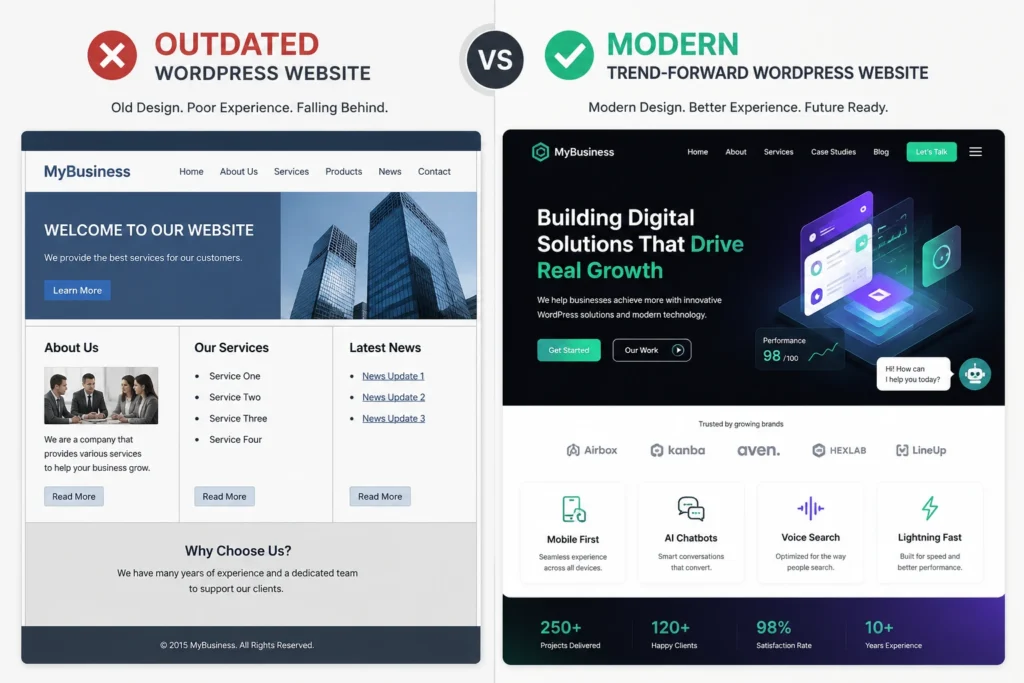
A website built without awareness of current trends risks two specific problems. First, it may use outdated approaches that perform poorly compared to modern alternatives. Second, it may miss new capabilities that would meaningfully improve visitor experience or business outcomes.
Furthermore, WordPress trends do not always require a complete website rebuild to implement. Many of the developments covered in this guide can be applied to existing websites through configuration changes, plugin additions, or theme updates. Consequently, staying informed helps you improve continuously rather than only during major redesign projects.
The Top WordPress Trends Right Now
1: AI Integration Across the WordPress Ecosystem
Artificial intelligence has moved from a marketing buzzword to a genuinely functional component of modern WordPress websites. Furthermore, AI tools now touch nearly every aspect of WordPress — content creation, SEO optimization, customer support, image generation, and performance analysis.
AI-powered writing assistants now appear directly within the WordPress editor. Furthermore, SEO plugins like Rank Math use AI to analyze content and suggest improvements in real time — checking keyword density, readability, and semantic relevance as you write. Consequently, even non-expert content creators produce better-optimized content with AI guidance than experienced writers working without it.
Intelligent chatbots now integrate directly with WordPress and WooCommerce through dedicated plugins. Furthermore, these chatbots handle customer inquiries, qualify leads, and guide visitors toward products or services without human involvement. Moreover, modern AI chatbots trained on your specific website content answer questions accurately rather than providing generic responses. Consequently, businesses extend effective customer service beyond business hours without increasing support staffing costs.
WordPress plugins now deliver AI-driven personalization — showing different content, product recommendations, and calls to action to different visitors based on their browsing behavior and preferences. Furthermore, this capability previously required enterprise-level platform investments. Consequently, small and medium businesses access sophisticated personalization through accessible WordPress plugin solutions.
2: Headless and Decoupled WordPress Architecture
Headless WordPress separates the content management backend from the front-end presentation layer. Furthermore, instead of WordPress rendering pages directly through PHP templates, it serves content through APIs that any front-end technology can consume — React, Vue, Next.js, or mobile applications.
The headless approach delivers several genuine advantages. Front-end developers gain complete freedom to use modern JavaScript frameworks without WordPress theme constraints. Furthermore, performance improves significantly because front-end applications built on React or Next.js render faster than traditional PHP-rendered WordPress pages.
Moreover, the same WordPress content backend simultaneously serves a website, a mobile app, and any other digital channel — all through the same API. Consequently, content managers update once and that content appears everywhere the brand exists digitally.
Enterprise organizations managing content across multiple digital surfaces benefit most directly. Furthermore, development teams who prefer working in JavaScript frameworks find headless WordPress removes friction between their preferred tools and the client’s content management needs. Consequently, headless WordPress is growing fastest in agencies serving enterprise clients with complex, multi-channel digital presences.
3: Full Site Editing and Block Themes
Full Site Editing (FSE) represents the maturation of WordPress’s block editor beyond posts and pages into complete website design control. Furthermore, with a block theme installed, every visual element of your website — headers, footers, sidebars, archive templates, and single post layouts — becomes editable through the same block interface you use for content.
Previously, designing a WordPress header or footer required either editing PHP theme files or using a separate page builder’s header/footer builder. Furthermore, this created a disconnect between content editing and template editing. FSE eliminates this entirely — everything happens in the same visual interface.
Moreover, block patterns and global styles allow site-wide design decisions to propagate instantly across every page. Consequently, maintaining visual consistency becomes significantly easier as websites grow in complexity.
Block themes are replacing classical PHP themes as the standard for modern WordPress development. Furthermore, new themes built on the block architecture offer native FSE compatibility that provides better performance and tighter integration with WordPress core than legacy theme structures. Consequently, websites built on block themes are better positioned for future WordPress development than those still relying on classic theme architecture.
4: Dark Mode UI
Dark mode has become a mainstream user interface preference rather than a niche design choice. Furthermore, operating systems, browsers, and popular applications now all support dark mode — and users who prefer it expect their favorite websites to respect that preference automatically.
Dark backgrounds reduce eye strain in low-light environments — a genuine comfort benefit for evening browsing. Furthermore, on OLED screens, dark mode actively conserves battery life by powering fewer pixels. Moreover, for certain product categories — technology, gaming, creative tools, luxury brands — dark aesthetics communicate the right brand personality more effectively than light alternatives.
WordPress themes increasingly include built-in dark mode support that detects the visitor’s operating system preference and adapts automatically. Furthermore, dedicated dark mode plugins add this capability to existing themes without requiring a theme change. Consequently, websites that previously required manual toggle options can now offer seamless automatic dark mode based on each visitor’s system settings.
5: Voice Search Optimization
Voice search has changed how people phrase their queries. Furthermore, spoken searches use natural conversational language rather than the abbreviated keyword phrases typical of typed searches. Consequently, WordPress websites optimized for voice search structure content around questions and conversational answers rather than traditional keyword targeting alone.
Voice search queries are typically longer and more conversational than typed queries. Furthermore, they frequently take question form — “what is the best WordPress plugin for contact forms” rather than “WordPress contact form plugin.” Consequently, FAQ sections, question-based headings, and conversational content that directly answers common questions perform significantly better in voice search results.
Schema markup — specifically FAQ schema — helps search engines identify and serve your content as voice search answers. Furthermore, Rank Math and Yoast SEO both simplify FAQ schema implementation through visual interfaces that do not require manual code. Moreover, targeting featured snippet positions increases your content’s likelihood of appearing as a voice search answer. Consequently, voice search optimization and featured snippet optimization are effectively the same strategy.
6: Minimalist Design and White Space
Minimalist design has moved from a stylistic preference to a performance and user experience standard. Furthermore, website visitors process fewer visual elements faster — minimalist layouts reduce cognitive load and guide attention toward what matters most.
Minimalist WordPress themes load faster than feature-heavy alternatives because they carry less visual complexity, fewer scripts, and leaner CSS. Furthermore, this performance advantage translates directly into better Core Web Vitals scores and improved search rankings. Moreover, clean layouts with generous white space make content more readable on mobile devices — where minimalism transitions from aesthetic choice to practical necessity.
Many website owners instinctively fill empty areas with additional content, widgets, or images. Furthermore, experienced designers understand that white space actively improves communication by separating elements, creating visual hierarchy, and directing the eye toward priority content. Consequently, removing elements from a WordPress website often improves conversion rates more than adding new ones.
7: Video Backgrounds and Motion Design
Video backgrounds have evolved from impressive novelty to standard design tool for WordPress websites where storytelling and emotional impact drive business outcomes. Furthermore, advances in video compression and browser support have made video backgrounds fast enough to use without significant performance penalties when implemented correctly.
Full-screen video heroes suit service businesses, creative agencies, hospitality brands, and any organization where the emotional experience of their offering matters as much as the technical specification. Furthermore, yoga studios, real estate brands, luxury product companies, and professional service firms all use video backgrounds effectively to communicate atmosphere before visitors read a single word.
Performance-conscious video implementation uses compressed, looping clips under 10 seconds rather than long video files. Furthermore, disabling autoplay on mobile devices prevents the data consumption that creates negative experiences for cellular users. Moreover, providing a static image fallback ensures visitors on slower connections still see a professional homepage rather than a blank area waiting for video to load.
8: WooCommerce Growth and Advanced eCommerce
WooCommerce continues expanding beyond standard product listing and checkout functionality. Furthermore, the WooCommerce ecosystem now supports sophisticated eCommerce capabilities — subscription products, dynamic pricing rules, personalized recommendations, loyalty programs, and marketplace functionality — through dedicated plugins and extensions.
Direct selling through social media integrations has become standard WooCommerce functionality. Furthermore, connecting your WooCommerce catalog to Instagram Shopping, Facebook Shops, and Google Shopping allows products to appear natively within social platforms. Consequently, customers complete purchases without leaving the social environment where they discovered the product — reducing the friction that previously interrupted impulse purchases.
As WooCommerce stores grow in product catalog size and traffic volume, performance optimization becomes increasingly important. Moreover, unoptimized WooCommerce stores slow down as catalog size increases — affecting both customer experience and search rankings.
9: Enhanced Security and Managed Maintenance
WordPress security has matured from a reactive concern into a proactive managed practice. Furthermore, the growth of managed WordPress hosting and maintenance services has made professional-grade security accessible to websites of all sizes — not just enterprise organizations with dedicated IT departments.
Modern WordPress security involves multiple layers working simultaneously — server-level firewall protection, application-level security plugins, automated malware scanning, login protection, and regular vulnerability monitoring. Furthermore, managed WordPress hosting providers handle many of these layers automatically, removing the technical burden from website owners.
Every WordPress website handles data that deserves protection — contact form submissions, user accounts, and in many cases payment information. Furthermore, SSL certificates encrypt this data in transit and signal to visitors through the browser padlock that their connection is secure. Consequently, SSL is simultaneously a security necessity, a trust signal, and a direct Google ranking factor.
10: Mobile-First Performance Optimization
Mobile-first is no longer a design principle — it is the default measurement standard for WordPress performance. Furthermore, Google’s mobile-first indexing means your mobile experience determines your search rankings regardless of how your desktop version performs. Consequently, every performance optimization decision now starts with the mobile experience rather than treating it as a secondary consideration.
Google’s Core Web Vitals — Largest Contentful Paint, Cumulative Layout Shift, and Interaction to Next Paint — measure the actual quality of user experience on both desktop and mobile. Furthermore, these metrics are ranking factors, making performance optimization simultaneously a user experience and SEO investment.
Lightweight themes, optimized images in WebP format, lazy loading, and quality hosting with server-level caching all contribute meaningfully to mobile performance. Furthermore, performance plugins like WP Rocket apply many of these optimizations automatically through a single installation. Moreover, regular PageSpeed testing identifies specific issues that need attention as your site grows and changes over time.
How These Trends Affect Your Existing WordPress Website
Not every trend applies equally to every WordPress website. The relevant priority depends on your website type, audience, and business goals.
| Website Type | Most Relevant Trends |
|---|
| Business Website | Mobile-first design, minimalist layouts, AI chatbots, voice search |
| eCommerce Store | WooCommerce growth, AI personalization, performance optimization, enhanced security |
| Blog / Content Site | Full Site Editing (FSE), block themes, voice search, mobile-first performance |
| Agency / Creative Website | Video backgrounds, dark mode, headless WordPress |
| News / Media Website | Mobile-first design, Full Site Editing (FSE), performance optimization, voice search |
Furthermore, implementing trends strategically — starting with those that directly address your current performance gaps — delivers better returns than trying to adopt everything simultaneously. Consequently, begin by identifying which trends solve problems your website currently has rather than adding features for their own sake.
Conclusion
WordPress trends are not trends in the fashion sense — they do not appear and disappear within a season. Furthermore, each development covered in this guide reflects a genuine shift in how websites perform, how users interact with content, and how businesses generate value through their digital presence.
AI integration is making websites smarter. Full Site Editing is simplifying design control. Headless architecture is unlocking multi-channel flexibility. Dark mode and minimalist design are improving reading comfort. Voice search optimization is capturing conversational queries. Performance optimization is protecting search rankings.
Moreover, the most important insight is this — these trends work together rather than in isolation. A fast, mobile-optimized WordPress website with AI-powered personalization, strong security, and voice-search-friendly content does not represent several separate improvements. It represents a single coherent approach to building a website that serves visitors well and performs strongly in search.
Therefore, pick the two or three trends most relevant to your current website’s weaknesses and implement them deliberately. Consequently, your WordPress website improves continuously rather than falling behind while waiting for a complete overhaul.
Frequently Asked Questions (FAQs)