WordPress core does an enormous amount out of the box. Furthermore, it still cannot do everything every website owner will ever need — and that gap is precisely what plugins exist to fill.
Plugins allow you to greatly extend the functionality of WordPress without touching WordPress core itself. Furthermore, this single capability explains why WordPress has grown from a simple blogging tool into the platform powering everything from personal portfolios to enterprise eCommerce stores. Consequently, understanding how plugin development actually works — even at a conceptual level — helps every WordPress user make smarter decisions about their site, whether they ever write a line of code or not.
In this guide, we walk through what WordPress plugin development genuinely involves — the foundational rule every plugin respects, how plugins connect to WordPress through hooks, the security practices that separate trustworthy plugins from risky ones, and the tools professional developers actually use to build them. Furthermore, whether you are considering building your first plugin or simply want to understand what happens behind the scenes of your favorite tools, this guide gives you a clear picture.
What Is a WordPress Plugin, Exactly?
Furthermore, WordPress plugins, also known as add-ons or extensions, are zipped code packages that enhance the functionality of WordPress websites. They enable users, even those without extensive coding knowledge, to add a wide range of features — from simple modifications like contact forms and SEO tools to complex functionalities like creating online stores and membership platforms.
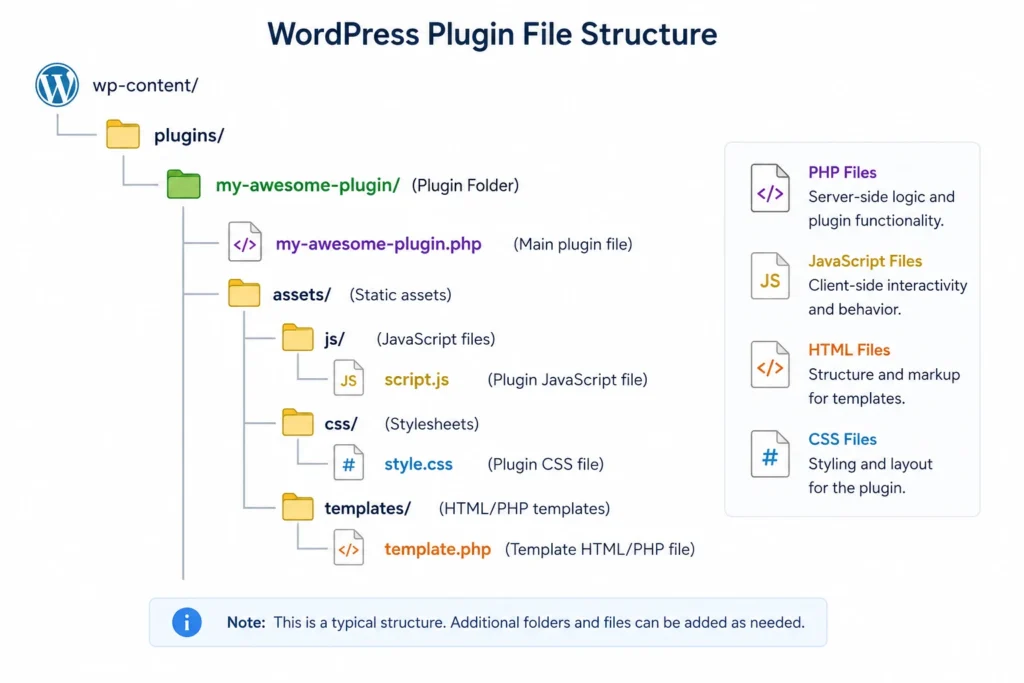
Furthermore, plugins are typically a combination of PHP, JavaScript, HTML, and CSS, integrating flawlessly with WordPress. Moreover, more modern plugins increasingly lean on JavaScript specifically, reflecting the broader shift toward interactive, block-based interfaces within WordPress itself.
Furthermore, plugins allow users to tailor their sites without directly modifying the theme or core WordPress code, maintaining website security and integrity while still enabling genuine customization and scalability. Consequently, a well-built plugin ecosystem is precisely why WordPress can be simultaneously stable and infinitely customizable.
The One Cardinal Rule of WordPress Plugin Development
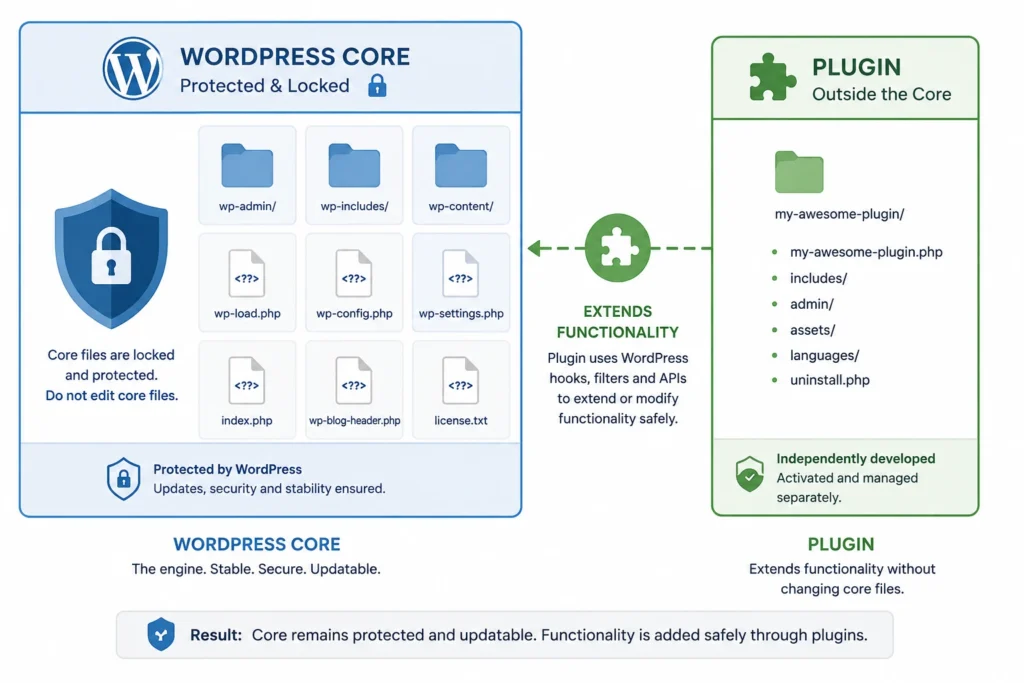
Furthermore, if there is one cardinal rule in WordPress development, it is this: never touch WordPress core. This means developers do not edit core WordPress files to add functionality to a site, because WordPress overwrites core files with every single update.
Consequently, any functionality a developer wants to add or modify gets built using plugins instead. Furthermore, this separation is precisely what makes WordPress genuinely upgradeable — core updates apply safely because custom functionality lives entirely outside the files WordPress touches during an update.
Furthermore, WordPress plugins can be as simple or as complicated as genuinely needed, depending on what they aim to do. The simplest plugin is a single PHP file requiring only a plugin header, a couple of PHP functions, and some hooks to attach those functions to WordPress. Consequently, this scalability — from a five-line utility to a full eCommerce platform like WooCommerce — is exactly what makes the plugin system so powerful.
How Plugins Actually Connect to WordPress: The Hooks System
Furthermore, understanding hooks is genuinely the key to understanding how plugin development works at a technical level. Hooks let a plugin’s custom functions run at specific, predetermined moments during WordPress’s normal execution — without ever touching the core code that defines those moments.
Actions vs Filters
Furthermore, WordPress hooks come in two types. Action hooks let you add custom functionality at a specific point — for example, running a function right after a new post publishes. Filter hooks let you modify data before WordPress uses or displays it — for example, changing how a post’s excerpt gets formatted before it appears on the page.
Why This Architecture Matters
Furthermore, this hook-based architecture means dozens of plugins can all extend the same WordPress installation simultaneously without conflicting or overwriting each other’s work — as long as each one follows the intended hook system rather than trying to modify core behavior directly. Consequently, this is precisely why a single WordPress site can run an SEO plugin, a security plugin, a caching plugin, and a page builder together without them destroying one another’s functionality.
Security: The Non-Negotiable Foundation of Plugin Development
Furthermore, plugin security deserves attention as a foundational concern, not an afterthought — since plugins run with meaningful access to your site’s database and functionality.
Core Security Practices Every Plugin Should Follow
Furthermore, well-built plugins consistently validate and sanitize any data coming in from users before processing it, preventing malicious input from causing harm. Moreover, they escape output properly before displaying anything back to the browser, preventing cross-site scripting vulnerabilities. Additionally, they check user capabilities before allowing sensitive actions, ensuring only authorized users can perform administrative functions. Furthermore, they use nonces — unique security tokens — to verify that form submissions and requests genuinely originate from your own site rather than a malicious third party.
Why This Matters for Every WordPress Site Owner
Furthermore, this is precisely why choosing plugins from reputable sources, with active maintenance and genuine security track records, matters so much for regular WordPress users — not just developers. Consequently, an outdated or poorly coded plugin represents one of the most common entry points for security breaches on WordPress sites overall.
Tools Professional Developers Use to Build Plugins
Furthermore, understanding the professional tooling behind plugin development helps explain why some plugins feel polished and reliable while others feel rushed and buggy.
Development Environment Tools
Furthermore, PhpStorm remains one of the most widely used IDEs for WordPress development specifically, offering a built-in WordPress module with plugin skeletons, Hooks support, and intelligent code completion tailored to WordPress’s coding patterns. Moreover, Chrome Developer Tools — built directly into the browser and completely free — let developers inspect page elements, debug JavaScript in real time, and analyze performance bottlenecks without any additional software installation.
Structure and Standards Tools
Furthermore, the WordPress Plugin Boilerplate provides a standardized, object-oriented foundation that speeds up development by offering a clear file structure and established best practices from the very first line of code. Moreover, PHP_CodeSniffer, paired specifically with WordPress Coding Standards, automatically identifies violations of WordPress’s official coding conventions — helping developers write consistent, maintainable code that other developers can easily understand and extend later.
Testing and Debugging Tools
Furthermore, PHPUnit allows developers to write automated tests that verify plugin functionality continues working correctly as new code gets added, catching bugs before they ever reach a live website. Moreover, Query Monitor provides comprehensive visibility into database queries, PHP errors, hooks firing on the current page, and enqueued scripts — making it genuinely invaluable for diagnosing performance issues and plugin conflicts. Additionally, PHP Debug Bar adds a convenient debug menu directly to the WordPress admin bar, letting developers track warnings and errors without leaving their browser.
Deployment and Management Tools
Furthermore, WP-CLI — the WordPress Command Line Interface — lets developers manage plugin installation, activation, updates, and even database operations directly from the terminal, dramatically speeding up repetitive development and testing tasks. Consequently, this tool alone often separates efficient professional workflows from slower, manual point-and-click processes.
The Building Blocks Every Plugin Developer Learns
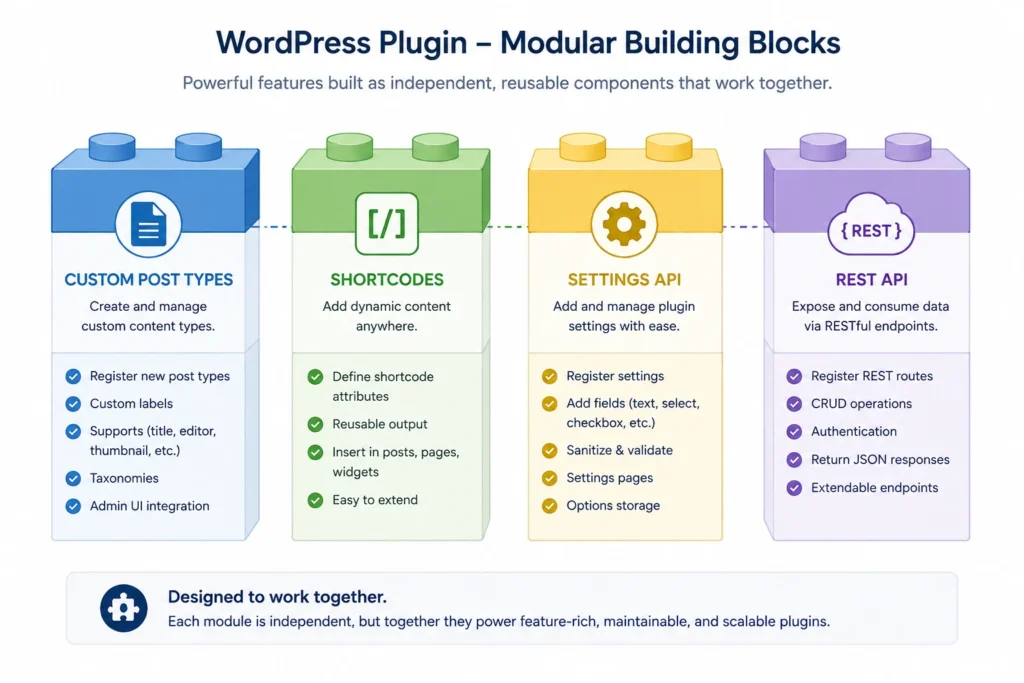
Furthermore, beyond hooks and security, several core WordPress systems form the genuine building blocks that most plugins rely on in some combination.
Custom Post Types let plugins create entirely new content types beyond standard posts and pages — a portfolio item, a product listing, or a testimonial, each with its own fields and behavior.
Furthermore, Shortcodes provide a simple way for plugins to let users insert dynamic content or functionality directly into posts and pages using a simple bracketed tag, without requiring any code knowledge from the end user.
Moreover, the Settings API and Options API give plugins a standardized, secure way to create admin configuration pages and store plugin-specific settings in the WordPress database.
Furthermore, the REST API lets plugins expose and consume data programmatically, enabling everything from mobile app integrations to headless WordPress setups where the front end runs on an entirely separate framework.
Consequently, understanding these building blocks — even without writing code yourself — helps you evaluate whether a plugin’s feature set genuinely fits your needs or whether it is stretching WordPress’s architecture further than it comfortably supports.
Common Mistakes in Plugin Development (and What They Mean for You)
Skipping Proper Uninstall Procedures
Furthermore, well-built plugins clean up after themselves — removing their own database tables and options when uninstalled, rather than leaving behind clutter that slows down your site indefinitely. Consequently, plugins that leave residual data behind after removal often signal less careful development practices overall.
Ignoring WordPress Coding Standards
Furthermore, plugins that ignore established WordPress coding standards often introduce subtle bugs, performance issues, or compatibility problems with other plugins and themes. Consequently, this is precisely why tools like PHP_CodeSniffer with WordPress Coding Standards matter so much in professional development workflows.
Inadequate Testing Before Release
Furthermore, plugins released without genuine testing — particularly automated testing through tools like PHPUnit — frequently ship with bugs that only surface after real users start relying on the plugin in production. Consequently, checking a plugin’s update history and changelog before installing gives you a meaningful signal about how seriously the developer treats testing and quality control.
Poor Security Practices
Furthermore, as covered earlier, inadequate input sanitization, output escaping, or capability checking creates genuine vulnerabilities. Consequently, this is exactly why choosing plugins with active maintenance, regular updates, and a strong reputation matters more than choosing based on features alone.
Should You Build a Custom Plugin or Use an Existing One?
When an Existing Plugin Makes More Sense
Furthermore, for the vast majority of standard needs — contact forms, SEO optimization, caching, security — a well-established, actively maintained plugin from the WordPress repository or a reputable premium developer almost always makes more sense than custom development. Consequently, this saves significant time and benefits from a plugin’s existing user base actively catching and reporting bugs.
When Custom Plugin Development Genuinely Pays Off
Furthermore, custom plugin development becomes worthwhile specifically when your business has unique workflow requirements that no existing plugin addresses — proprietary integrations with internal systems, highly specific automation needs, or functionality core to your competitive advantage. Consequently, in these cases, investing in custom development, following the security and structural best practices covered throughout this guide, delivers value that off-the-shelf solutions genuinely cannot match.
Conclusion
WordPress plugin development follows one guiding principle above everything else — extend functionality without ever touching core, using the hooks system WordPress provides specifically for that purpose.
Furthermore, this architecture is precisely what allows WordPress to update safely and frequently, while simultaneously supporting an enormous, ever-growing ecosystem of plugins built by developers worldwide. Moreover, the professional tools covered in this guide — from PhpStorm and WP-CLI to PHPUnit and Query Monitor — exist specifically to help developers build plugins that respect this architecture reliably and securely.
Therefore, whether you are evaluating which plugins to trust on your own WordPress site, or considering building a custom plugin for a genuinely unique business need, understanding these foundational principles — the cardinal rule, the hooks system, security best practices, and the building blocks plugins rely on — gives you the context to make better, more informed decisions either way.
Consequently, WordPress remains as flexible and powerful as it is precisely because of this plugin architecture — a system built deliberately to let anyone extend the platform without ever compromising its stability for everyone else.
Frequently Asked Questions (FAQs)