Every business building a website faces the same fork in the road. Option one — use a modern visual platform like Webflow that handles design, hosting, and code generation automatically. Option two — build with traditional web development methods using WordPress, custom code, or a framework of your choice.
Both approaches work. Furthermore, both power successful websites across every industry. However, the right choice depends entirely on your business type, budget, timeline, and long-term technical requirements.
Making the wrong decision costs real money. Moreover, rebuilding a website on a different platform after launch wastes months of work. Consequently, understanding the genuine differences between Webflow and traditional development before committing saves significant time and budget.
In this guide, we compare both approaches across every factor that actually matters — development speed, cost, customization, SEO, security, and scalability. Furthermore, we give you a clear framework for deciding which approach fits your specific situation.
What Is Webflow?
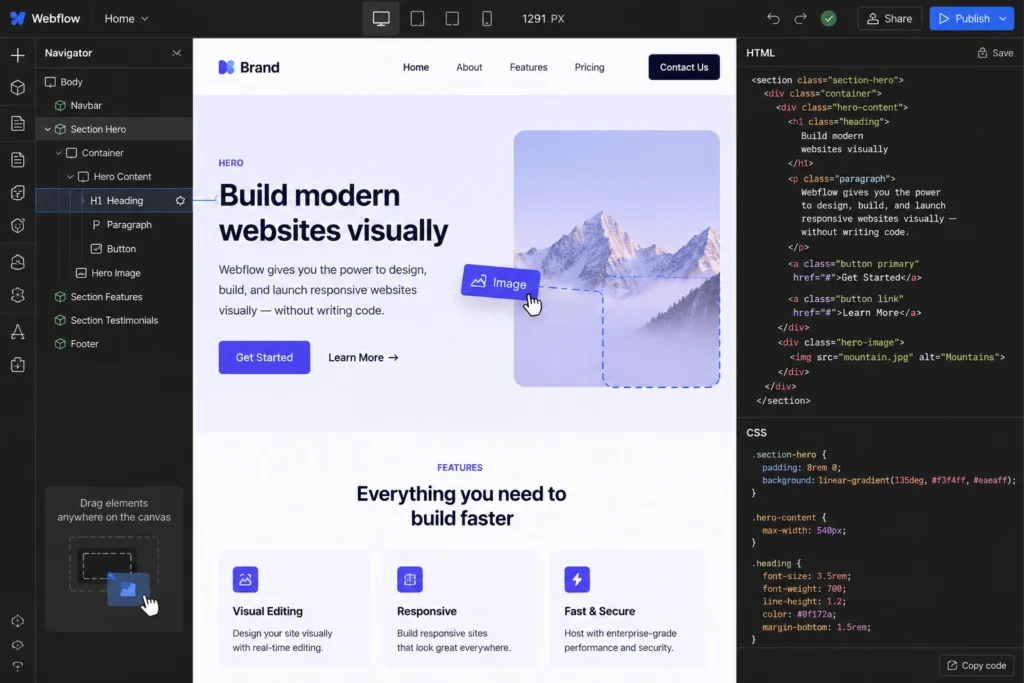
Webflow is a no-code website builder that generates clean HTML, CSS, and JavaScript automatically from visual design decisions. Furthermore, it includes built-in hosting, CMS, SSL, and SEO tools — making it a complete website platform rather than just a design tool.
Designers use Webflow to build pixel-perfect websites visually, while the platform handles the underlying code. Moreover, non-technical team members can update content through Webflow’s CMS without touching the design at all. Consequently, the entire website — design, content, hosting, and maintenance — lives in one managed environment.
What Makes Webflow Different
✅ Visual drag-and-drop design with clean, production-ready code output
✅ Built-in CMS for structured content management
✅ Automatic hosting, SSL, and security updates
✅ Native SEO tools — meta tags, sitemaps, clean URLs
✅ Figma-to-Webflow workflow for design teams
✅ No server management required
What Is Traditional Web Development?
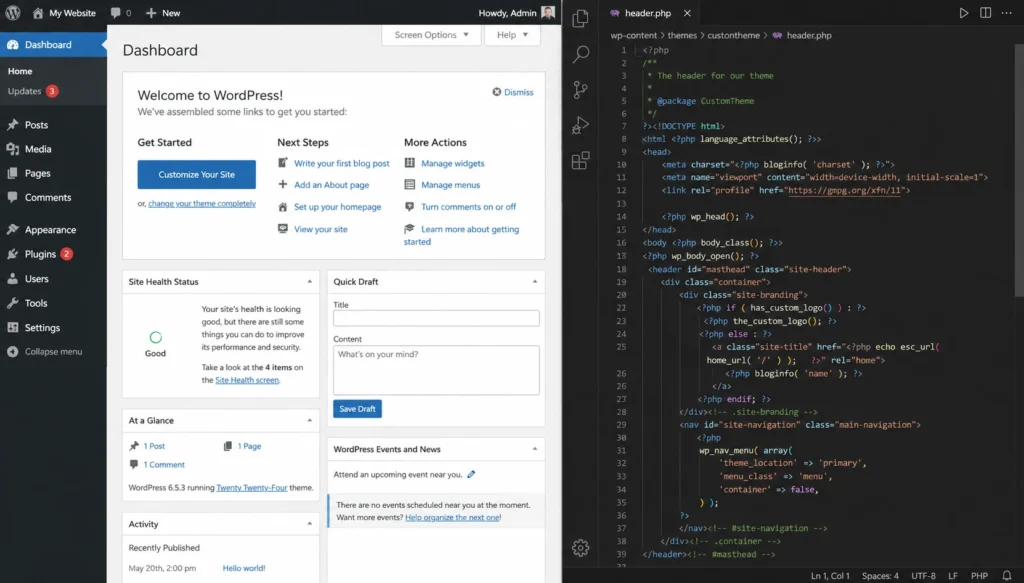
Traditional web development covers any approach involving manual coding, established CMS platforms like WordPress, or custom-built frameworks. Furthermore, it includes everything from a WordPress site built with Elementor to a fully custom application coded in React or Laravel.
The defining characteristic of traditional development is control. Moreover, developers access every layer of the technology stack — database, server configuration, application logic, and front-end code — and modify anything without platform restrictions.
What Traditional Development Includes
✅ WordPress with themes and plugins — most common approach
✅ Custom HTML, CSS, and JavaScript builds
✅ Framework-based development — React, Laravel, Vue
✅ Complete database and server control
✅ Unlimited third-party integrations
✅ Full ownership of all files and data
Side-by-Side Comparison at a Glance
| Factor | Webflow | Traditional (WordPress) |
|---|
| Setup Speed | Days to weeks | Weeks to months |
| Initial Cost | Lower | Varies widely |
| Customization | Moderate | Unlimited |
| SEO Tools | Built-in | Plugin-dependent |
| Security | Automated | Manual management |
| Scalability | Moderate | Unlimited |
| Ownership | Limited | Complete |
| Technical Skill Needed | Low to moderate | Low to advanced |
| Best For | Design-led, content sites | Complex, scalable platforms |
Now let us explore each factor in depth.
1: Development Speed
Webflow significantly compresses development timelines for most standard business websites. Furthermore, design and development happen simultaneously in the visual editor — eliminating the handoff gap between design and code that traditional projects require.
A skilled Webflow designer can take a project from wireframe to launched website in one to three weeks. Moreover, design teams working from Figma prototypes find Webflow’s import tools reduce implementation time dramatically compared to converting designs to hand-coded HTML.
Consequently, businesses with tight launch deadlines or limited development budgets find Webflow’s speed advantage meaningful and real.
Traditional Development Takes Longer — But for Good Reason
A custom WordPress build or framework-based project takes longer because it involves more deliberate decisions. Furthermore, setting up hosting infrastructure, configuring the database, building custom templates, and integrating third-party services all require sequential technical steps that cannot be automated away.
However, this additional time produces something Webflow cannot — a system built precisely for your specific requirements. Moreover, the extra development investment creates a foundation that supports complex functionality, deep integrations, and unlimited future customization. Consequently, the timeline gap between the two approaches narrows significantly for complex projects where Webflow’s limitations would require workarounds anyway.
Verdict: Webflow wins for speed on standard websites. Traditional development suits complex projects where customization requirements justify the timeline.
2: Cost Comparison
What Webflow Actually Costs
Webflow’s pricing includes hosting, SSL, and the visual editor in one subscription. Furthermore, plans start at approximately $14/month for basic sites and rise to $39/month and above for CMS-heavy or business-scale websites.
Realistic Webflow costs:
- Basic site plan — $14–23/month
- CMS plan (blogs, dynamic content) — $23–39/month
- Business plan — $39–74/month
- Ecommerce plans — $29–212/month
Moreover, Webflow’s bundled pricing makes initial cost comparison against traditional development appear favorable. Consequently, for standard business websites, Webflow’s all-in-one pricing genuinely simplifies budgeting.
What Traditional Development Costs
WordPress with WooCommerce or a custom build separates costs into components — hosting, domain, theme, plugins, and development. Furthermore, this separation means costs vary dramatically based on choices made at each stage.
Realistic WordPress costs:
- Domain + hosting — ₹10,000–₹30,000/year
- Premium theme — ₹0–₹8,000
- Essential plugins — ₹5,000–₹20,000/year
- Development (freelancer) — ₹15,000–₹1,50,000+
Moreover, WordPress charges zero platform transaction fees for eCommerce — a significant advantage over Webflow’s eCommerce plans which include their own transaction fees on lower tiers. Consequently, traditional development becomes more cost-effective than Webflow at scale, particularly for online stores.
Verdict: Webflow is simpler to budget upfront. Traditional development costs less long-term for growing businesses and eCommerce stores.
3: Customization and Flexibility
Webflow’s Customization Limits Are Real
Webflow gives designers exceptional visual control within its environment. Furthermore, pixel-perfect layouts, complex animations, and responsive design all work elegantly inside the platform.
However, Webflow’s customization hits genuine walls when projects require complex business logic, custom database structures, proprietary API integrations, or specialized eCommerce functionality. Moreover, checkout customization, advanced membership systems, and multi-vendor marketplace features all either require expensive workarounds or simply cannot be built in Webflow at all.
Consequently, businesses whose requirements grow beyond standard content websites consistently find Webflow’s architectural constraints frustrating.
Traditional Development Has No Ceiling
WordPress with the right plugins and theme handles virtually any website requirement. Furthermore, custom development removes all constraints entirely — if something can be built for the web, it can be built in a traditional development environment.
Moreover, over 60,000 WordPress plugins cover everything from complex membership systems to AI chatbots to advanced eCommerce configurations. Consequently, traditional development suits businesses whose requirements will evolve in directions that cannot be predicted at launch.
Verdict: Traditional development wins customization decisively — especially for complex or evolving requirements.
4: SEO and Performance
Webflow’s Built-In SEO Advantages
Webflow generates clean, semantic HTML code automatically — something that many WordPress themes and page builders fail to do consistently. Furthermore, Webflow includes native SEO tools — meta tag editing, automatic sitemaps, clean URL structures, and image optimization — without requiring third-party plugins.
Moreover, Webflow’s hosting infrastructure uses Fastly CDN globally, delivering consistently fast load times for most standard website content. Consequently, Webflow sites often achieve strong Core Web Vitals scores out of the box without additional performance optimization work.
WordPress SEO Is Equally Powerful — With the Right Setup
WordPress with Rank Math or Yoast SEO delivers complete SEO control that matches and often exceeds Webflow’s native capabilities. Furthermore, advanced schema markup, technical SEO auditing, keyword tracking, and Search Console integration all come standard with free plugin installations.
Moreover, WordPress’s hosting flexibility means you choose a provider optimized specifically for your traffic requirements. Consequently, properly configured WordPress sites perform competitively with Webflow on every Core Web Vitals metric when paired with quality hosting and a caching plugin.
Verdict: Both perform well. Webflow requires less setup. WordPress offers more advanced SEO control with proper plugin configuration.
5: Security and Maintenance
Webflow Handles Security Automatically
Security is one of Webflow’s strongest genuine advantages over traditional development. Furthermore, SSL certificates, platform updates, security patches, and infrastructure maintenance all happen automatically without any action required from website owners.
Webflow’s hosting environment uses enterprise-grade security infrastructure. Moreover, because Webflow controls the entire stack, vulnerabilities get patched platform-wide rather than requiring individual website owners to apply updates manually. Consequently, Webflow websites face significantly lower risk from common attack vectors like outdated plugin vulnerabilities.
WordPress Security Requires Active Management
WordPress security is excellent when properly managed — and problematic when neglected. Furthermore, the platform’s popularity makes it a frequent target for automated attacks that exploit outdated plugins and themes.
Maintaining a secure WordPress website requires regular updates, a security plugin like Wordfence, daily backups, SSL configuration, and periodic security audits. Moreover, these tasks take time and occasional technical involvement. Consequently, website owners who cannot commit to regular maintenance either hire ongoing support or face increasing security risk over time.
Verdict: Webflow wins security and maintenance for non-technical website owners. WordPress is equally secure with proper management but requires ongoing attention.
6: Scalability
Webflow Scales Well for Content Sites
Webflow handles growing content volumes, increasing traffic, and expanding team collaboration effectively for most standard business and content websites. Furthermore, its global CDN infrastructure manages traffic spikes without manual server intervention.
However, Webflow’s scalability has a ceiling. Complex eCommerce requirements, membership platforms serving thousands of concurrent users, and applications requiring custom server-side logic all push beyond what Webflow’s architecture supports. Consequently, fast-growing businesses with evolving technical requirements eventually outgrow Webflow in ways that require full platform migration.
Traditional Development Scales Without Limits
WordPress scales from a five-page business website to an enterprise platform serving millions of users through hosting upgrades alone. Furthermore, VPS and cloud hosting options grow with your traffic without requiring code changes or platform migration.
Moreover, WordPress’s open architecture means new features, integrations, and capabilities can always be added regardless of how complex your requirements become. Consequently, traditional development suits businesses planning significant long-term growth in directions that cannot be fully defined at launch.
Verdict: Traditional development wins scalability for complex, high-growth businesses. Webflow suits content-focused sites with predictable requirements.
Who Should Choose Webflow?
✅ You are a designer or design agency creating visually complex websites
✅ Your website is primarily content — blog, portfolio, marketing pages
✅ You want launch in days or weeks rather than months
✅ Your team needs to update content without technical skills
✅ You prefer managed security and hosting with no server management
✅ Your requirements are standard and unlikely to need deep customization
✅ Budget is limited and bundled platform pricing simplifies decisions
Who Should Choose Traditional Web Development?
✅ You need complete ownership and control of your website
✅ Your requirements include complex eCommerce, membership, or custom logic
✅ SEO and content marketing are central to your growth strategy
✅ You plan to scale significantly and unpredictably over time
✅ You want to avoid platform lock-in and monthly subscription fees
✅ Your business is in India and benefits from WooCommerce’s zero transaction fees
✅ Long-term cost efficiency matters more than short-term speed
Final Verdict
| Factor | Winner |
|---|
| Development Speed | Webflow |
| Cost (Long-term) | Traditional |
| Customization | Traditional |
| SEO Performance | Both |
| Security & Maintenance | Webflow |
| Scalability | Traditional |
Traditional development wins four of six factors. Furthermore, the two Webflow wins — speed and security — matter most to non-technical users with simple, content-focused websites.
Consequently, the right choice depends less on which platform is objectively better and more on what your specific business actually needs. A design studio launching a portfolio needs different things than a startup building a membership platform.
Conclusion
Webflow and traditional web development both solve real problems for real businesses. Furthermore, neither deserves the absolute dismissal that passionate advocates of the other sometimes give them.
Choose Webflow when speed, visual design quality, and managed infrastructure matter most — and when your requirements are clearly defined and unlikely to change dramatically. Moreover, design studios, freelancers, and small businesses with content-focused websites find genuine value in Webflow’s streamlined approach.
Choose traditional development — particularly WordPress — when you need complete ownership, unlimited scalability, complex eCommerce, or a content marketing engine that drives long-term organic growth. Furthermore, businesses that build on WordPress invest in an asset they own permanently rather than a subscription service they rent.
Consequently, the most important question is not “which platform is better?” It is “which platform is right for where my business is going?”
Frequently Asked Questions (FAQs)