

Understanding WordPress costs helps you evaluate proposals accurately. Read: WordPress Website Cost: An Actual WordPress Price
Freelancer vs WordPress Development Company — Which Should You Choose?
Before searching for candidates, decide which type of partner your project actually needs. Furthermore, choosing the wrong category wastes evaluation time and sometimes leads to projects that are fundamentally mismatched from the start.
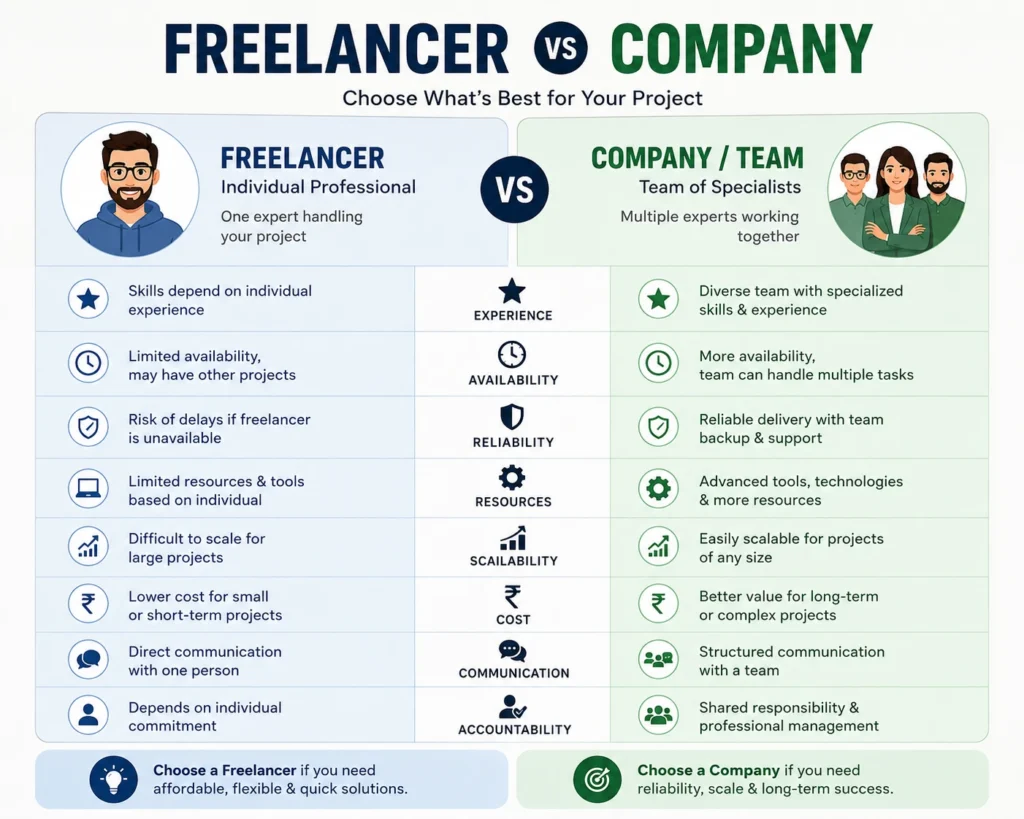
| Factor | Freelancer | WordPress Company |
|---|---|---|
| Cost | Lower | Higher |
| Availability | Limited | Dedicated team |
| Specialization | One or two skills | Full-stack capability |
| Accountability | Individual | Company reputation |
| Scalability | Limited | Handles larger scope |
| Communication | Direct | Managed through a Project Manager (PM) |
| Best For | Simple websites, tight budgets | Complex projects, ongoing support |
When a Freelancer Makes Sense
When a WordPress Development Company Is Worth the Investment
10 Questions to Ask Before Hiring a WordPress Development Company
1: Do You Build Custom or Use Page Builders?
Page builders like Elementor and Divi suit most business websites and eCommerce stores. They produce maintainable, editable websites that non-technical clients can update independently. Moreover, they typically cost less and deliver faster.
Custom code suits complex web applications, unique interactive features, and situations where page builder limitations would require constant workarounds. Consequently, understanding which approach the company uses — and why — tells you whether their standard methodology fits your specific project.
Understand the difference between page builder approaches. Read: Best Page Builder Plugins for WordPress (Elementor vs Divi vs Gutenberg)
2: Will You Build on a Staging Environment?
3: How Do You Handle Core Web Vitals and Page Speed?
4: Who Owns the Code and Files After Launch?
5: What Does Post-Launch Support Include?
6: How Do You Handle SEO During Development?
Know what proper WordPress SEO setup involves. Read: How to Install and Set Up Rank Math SEO
7: How Do You Select and Vet Plugins?
8: Can You Handle Traffic Growth and Scalability?
Hosting choice determines your site’s scalability ceiling. Read: How to Choose the Best WordPress Hosting
9: What Is Your Full Cost Breakdown?
10: What Does Your Development Process Look Like?
What to Look for in a Portfolio
Check Industry Relevance
Test the Live Websites
Look for Longevity
Red Flags to Watch For
No clear contract or written scope — Verbal agreements about project scope lead to disputes. Furthermore, every professional development engagement requires a signed contract specifying deliverables, timeline, payment terms, and ownership.
Unusually low pricing — Development that costs significantly less than market rates either cuts corners, uses inexperienced developers, or generates revenue through scope creep invoices later. Consequently, the cheapest proposal frequently produces the most expensive total project.
Unwilling to provide references — A company confident in their work provides client references without hesitation. Furthermore, reluctance to share references signals either a short track record or clients who would not speak positively.
No staging environment in their process — Companies that build directly on live websites lack professional development discipline. Moreover, this approach risks your existing content and rankings throughout the project.
Vague answers about post-launch support — Companies that avoid specific commitments about post-launch support leave you without recourse when bugs appear after delivery.
No portfolio of completed, live websites — Mockups and screenshots without live URLs to verify cannot confirm actual delivery capability. Furthermore, every established development company has live websites you can test directly.
Pre-Launch WordPress Development Checklist
Design and Content
✅ All pages display correctly on desktop, tablet, and mobile
✅ All images are optimized and have descriptive alt text
✅ All fonts load correctly across browsers
✅ Brand colors and typography are consistent throughout
✅ All placeholder content has been replace
Development and Functionality
✅ All contact forms submit correctly and send notifications
✅ All links work — no 404 errors on internal links
✅ All buttons function correctly on touch screens
✅ WordPress, theme, and all plugins are updated to latest versions
✅ Staging tests completed before live deployment
SEO Configuration
✅ SEO plugin (Rank Math or Yoast) installed and configured
✅ Meta titles and descriptions set for all key pages
✅ XML sitemap generated and submitted to Google Search Console
✅ Google Analytics connected and tracking correctly
✅ All old URLs redirect correctly to new equivalents (if redesign)
Security and Performance
✅ SSL certificate active — all pages load on HTTPS
✅ Security plugin installed and configured
✅ Automated backup system running and tested
✅ PageSpeed scores above 70 on both mobile and desktop
✅ Login URL changed from default /wp-admin/
Handover
✅ Admin login credentials delivered securely
✅ Hosting and domain access transferred to client
✅ All plugin license keys provided to client
✅ Basic CMS training completed or recorded
✅ Post-launch support terms confirmed in writing
SSL must be active before your site launches. Read: Do You Need SSL for Your WordPress Website?
How to Work Effectively After Hiring
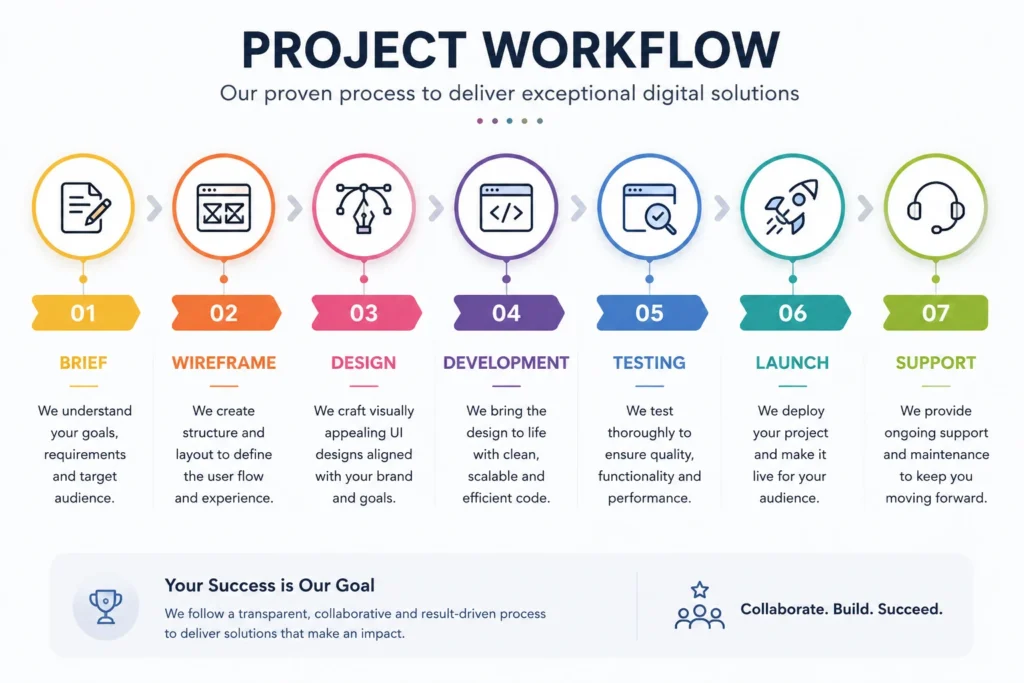
Provide a Clear Brief
Agree on Milestones Before Starting
Consolidate Feedback
Test Thoroughly Before Signing Off
Conclusion
Frequently Asked Questions (FAQs)
How much does it cost to hire a WordPress development company?
Costs vary significantly based on project complexity and company reputation. Furthermore, basic business websites handled by established companies typically range from ₹50,000 to ₹2,00,000. Complex eCommerce projects or custom web applications range from ₹2,00,000 to ₹10,00,000+. Consequently, getting three comparable proposals with detailed scope breakdowns helps you evaluate fair market pricing for your specific project.
How long does WordPress website development take?
A standard business website typically takes 4 to 8 weeks from signed contract to launch. Furthermore, complex eCommerce stores or custom-featured websites take 8 to 16 weeks. Timeline depends heavily on how quickly clients provide content, feedback, and approvals — delays on the client side are as common as delays on the development side. Consequently, agreeing on a realistic timeline with specific milestone dates prevents projects from drifting indefinitely.
Should I choose a local or remote WordPress development company?
Location matters less than capability, communication quality, and track record. Furthermore, many excellent WordPress development companies work entirely remotely with clients across different cities and countries. What matters most is their portfolio quality, communication responsiveness, and clarity of their development process. Consequently, evaluate on merit rather than proximity — limiting your search to local companies unnecessarily reduces your candidate pool.
What should a WordPress development contract include?
A professional contract should specify project scope, timeline with milestones, payment schedule, intellectual property ownership, post-launch support terms, and change request procedures. Furthermore, it should clearly state what happens if either party needs to exit the project before completion. Consequently, never begin a development project without a signed contract covering all of these elements — verbal agreements are unenforceable when disputes arise.
How do I evaluate if a WordPress development company is technically strong?
Ask them to explain their approach to Core Web Vitals optimization, plugin security vetting, and staging environment usage. Furthermore, request PageSpeed Insights scores from recent live projects. Moreover, ask whether they follow WordPress coding standards and how they handle plugin conflicts. Consequently, technically strong companies answer these questions confidently with specific examples while weaker ones give vague or evasive responses.