

How to Choose a WordPress Development Company (Checklist)

how to choose the right web design agency for your website redesign and business growth
The website launches late. The code breaks after the first plugin update. You request a small change and receive an invoice for hours of work nobody mentioned upfront. Furthermore, when you need support, the company has moved on to the next client.
This experience is more common than most businesses expect — and almost always preventable. Consequently, the difference between a successful WordPress project and a frustrating one comes down to how carefully you evaluate your options before signing anything.
In this guide, we walk through everything you need to know — how to compare freelancers against companies, what to look for in a portfolio, which questions to ask before hiring, and a practical checklist to evaluate any WordPress development partner. Moreover, we cover the red flags that experienced buyers recognize immediately but first-timers often miss until it is too late.

Understanding WordPress costs helps you evaluate proposals accurately. Read: WordPress Website Cost: An Actual WordPress Price

Freelancer vs WordPress Development Company — Which Should You Choose?

Before searching for candidates, decide which type of partner your project actually needs. Furthermore, choosing the wrong category wastes evaluation time and sometimes leads to projects that are fundamentally mismatched from the start.
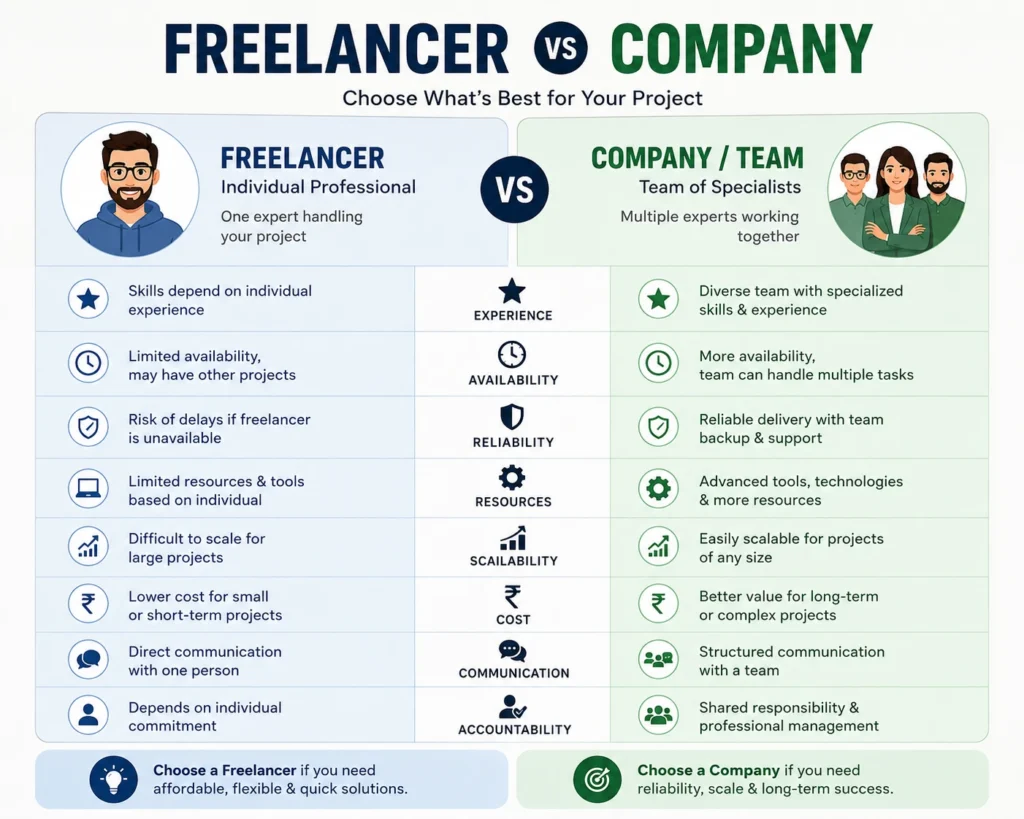
Comparison card showing freelancer profile versus company team with key differences.
FactorFreelancerWordPress Company
CostLowerHigher
AvailabilityLimitedDedicated team
SpecializationOne or two skillsFull-stack capability
AccountabilityIndividualCompany reputation
ScalabilityLimitedHandles larger scope
CommunicationDirectManaged through a Project Manager (PM)
Best ForSimple websites, tight budgetsComplex projects, ongoing support

When a Freelancer Makes Sense

A skilled WordPress freelancer suits straightforward projects with clearly defined scope — a business website with standard pages, a blog redesign, or a basic WooCommerce store setup. Furthermore, freelancers typically cost less and communicate more directly than agencies. Consequently, small businesses with limited budgets and simple requirements often get better value from the right freelancer than from a full agency engagement.

When a WordPress Development Company Is Worth the Investment

A WordPress development company suits projects where complexity, accountability, and long-term support matter. Furthermore, companies offer dedicated project management, multiple specialists working simultaneously, and institutional knowledge that survives individual team members leaving. Consequently, businesses building complex platforms, eCommerce stores, or websites central to their revenue generation benefit from the structure and continuity companies provide.

10 Questions to Ask Before Hiring a WordPress Development Company

These questions separate capable development partners from impressive-sounding proposals.

1: Do You Build Custom or Use Page Builders?

This question reveals more than it appears to. Furthermore, neither answer is automatically wrong — but the answer needs to match your project requirements.

Page builders like Elementor and Divi suit most business websites and eCommerce stores. They produce maintainable, editable websites that non-technical clients can update independently. Moreover, they typically cost less and deliver faster.

Custom code suits complex web applications, unique interactive features, and situations where page builder limitations would require constant workarounds. Consequently, understanding which approach the company uses — and why — tells you whether their standard methodology fits your specific project.

Understand the difference between page builder approaches. Read: Best Page Builder Plugins for WordPress (Elementor vs Divi vs Gutenberg)

2: Will You Build on a Staging Environment?

A staging environment is a private copy of your website where development and testing happen before anything goes live. Furthermore, any company that builds directly on a live website takes unnecessary risks with your existing content, SEO rankings, and customer experience.
The correct answer is always yes — staging first, live only after thorough testing. Moreover, ask where the staging environment lives and whether you can access it during development. Consequently, you review progress without waiting for scheduled demos.

3: How Do You Handle Core Web Vitals and Page Speed?

Google’s Core Web Vitals — Largest Contentful Paint, Cumulative Layout Shift, and Interaction to Next Paint — directly affect search rankings. Furthermore, a development company that cannot explain how they optimize for these metrics will likely deliver a website that underperforms in search regardless of how good it looks visually.
Ask specifically what steps they take during development to optimize loading speed. Moreover, request PageSpeed Insights scores from recent projects they have delivered. Consequently, you evaluate performance capability on real evidence rather than sales claims.

4: Who Owns the Code and Files After Launch?

This question surprises many first-time buyers — but it matters enormously. Furthermore, some development companies retain ownership of custom code, themes, or plugins they build for your project, creating ongoing dependency on their services.
The correct arrangement gives you complete ownership of all files, code, database, and hosting access after payment. Moreover, get this confirmed in writing before signing any contract. Consequently, you retain the ability to move to a different developer or hosting provider without renegotiating ownership.

5: What Does Post-Launch Support Include?

Development companies handle post-launch support very differently. Furthermore, some include 30 to 90 days of bug fixes at no extra charge. Others charge hourly for every post-launch request regardless of whether the issue existed at launch.
Ask specifically — what constitutes a bug versus a change request? Furthermore, what is the response time for critical issues? Moreover, is there an ongoing maintenance package available? Consequently, you understand exactly what happens if something breaks the week after launch before you need to find out under pressure.

6: How Do You Handle SEO During Development?

A beautifully designed WordPress website that launches with broken sitemaps, missing meta tags, incorrect redirect configurations, and unoptimized page titles starts its SEO life at a significant disadvantage. Furthermore, fixing these issues post-launch takes additional time and sometimes loses rankings earned by the existing website.
Ask which SEO plugin they configure by default. Moreover, ask whether meta titles, descriptions, and XML sitemaps are included in scope. Consequently, SEO foundations are built correctly from the start rather than added as an afterthought.

Know what proper WordPress SEO setup involves. Read: How to Install and Set Up Rank Math SEO

7: How Do You Select and Vet Plugins?

WordPress has over 60,000 plugins — and not all of them are safe, maintained, or compatible with each other. Furthermore, poorly chosen plugins create security vulnerabilities, slow down page loading, and conflict with other essential tools.
Ask how the company decides which plugins to use. Moreover, ask whether they check plugin update frequency, active installation counts, and security histories before recommending them. Consequently, your finished website does not carry hidden technical debt from poorly vetted third-party code.

8: Can You Handle Traffic Growth and Scalability?

Your website might launch for a small audience and grow to serve thousands of concurrent visitors within a year. Furthermore, a website built without scalability in mind requires expensive restructuring when that growth arrives.
Ask specifically how they architect websites for performance under traffic growth. Moreover, ask which hosting providers they recommend and why. Consequently, your website handles success rather than being broken by it.

Hosting choice determines your site’s scalability ceiling. Read: How to Choose the Best WordPress Hosting

9: What Is Your Full Cost Breakdown?

Proposals that show only a single total project number hide costs that appear later as change requests, additional phase invoices, or surprise charges at launch. Furthermore, understanding exactly what is and is not included prevents the budget overruns that damage relationships between clients and development companies.
Request a line-item breakdown covering — design, development, plugin licenses, hosting setup, SEO configuration, testing, training, and post-launch support. Moreover, ask explicitly what triggers additional charges outside the quoted scope. Consequently, you compare proposals on equivalent scope rather than discovering differences after signing.

10: What Does Your Development Process Look Like?

A professional WordPress development company follows a repeatable, documented process rather than figuring things out project by project. Furthermore, understanding their process reveals how much structure and communication you can expect throughout your project.
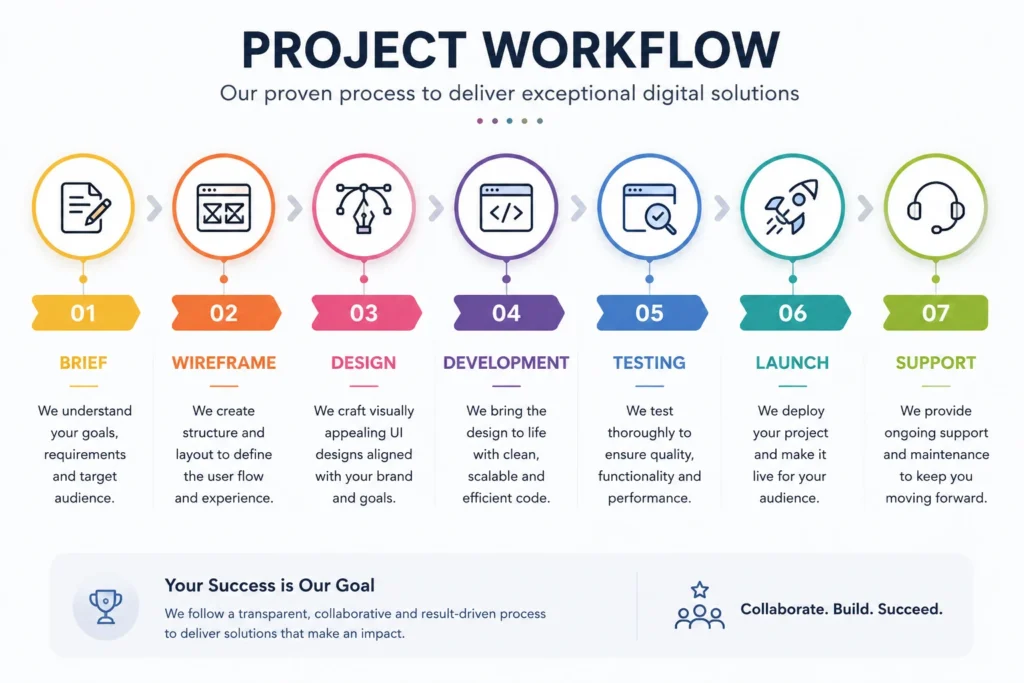
A strong development process typically includes — discovery and brief, sitemap and wireframes, design approval, development on staging, content integration, QA testing, client review, and controlled launch. Moreover, each phase should have clear deliverables and approval steps. Consequently, you know what to expect at every stage rather than waiting for updates that arrive irregularly.

What to Look for in a Portfolio

Every WordPress development company shows their best work. Furthermore, evaluating a portfolio effectively requires looking beyond visual appeal.

Check Industry Relevance

Look for projects in industries similar to yours. Furthermore, a company that has built multiple eCommerce stores understands your specific challenges better than one whose portfolio consists entirely of restaurant websites. Consequently, relevant experience reduces the discovery time your project requires.

Test the Live Websites

Visit the actual URLs from their portfolio rather than just viewing screenshots. Furthermore, test loading speed on your smartphone, navigate through multiple pages, and test any interactive features like contact forms. Moreover, check whether the websites look good on mobile. Consequently, real-world performance tells you more than curated screenshots ever will.

Look for Longevity

Ask when portfolio websites were built. Furthermore, a company showing only work from the past six months has less of a track record than one with strong projects spanning several years. Moreover, contact past clients if possible — a portfolio reference willing to speak honestly about their experience is more valuable than ten polished case studies.

Red Flags to Watch For

These signals consistently predict problematic development engagements:

No clear contract or written scope — Verbal agreements about project scope lead to disputes. Furthermore, every professional development engagement requires a signed contract specifying deliverables, timeline, payment terms, and ownership.

Unusually low pricing — Development that costs significantly less than market rates either cuts corners, uses inexperienced developers, or generates revenue through scope creep invoices later. Consequently, the cheapest proposal frequently produces the most expensive total project.

Unwilling to provide references — A company confident in their work provides client references without hesitation. Furthermore, reluctance to share references signals either a short track record or clients who would not speak positively.

No staging environment in their process — Companies that build directly on live websites lack professional development discipline. Moreover, this approach risks your existing content and rankings throughout the project.

Vague answers about post-launch support — Companies that avoid specific commitments about post-launch support leave you without recourse when bugs appear after delivery.

No portfolio of completed, live websites — Mockups and screenshots without live URLs to verify cannot confirm actual delivery capability. Furthermore, every established development company has live websites you can test directly.

Pre-Launch WordPress Development Checklist

Use this checklist to evaluate project completion before accepting delivery from any WordPress development company:

Design and Content

✅ All pages display correctly on desktop, tablet, and mobile

✅ All images are optimized and have descriptive alt text

✅ All fonts load correctly across browsers

✅ Brand colors and typography are consistent throughout

✅ All placeholder content has been replace

Development and Functionality

✅ All contact forms submit correctly and send notifications

✅ All links work — no 404 errors on internal links

✅ All buttons function correctly on touch screens

✅ WordPress, theme, and all plugins are updated to latest versions

✅ Staging tests completed before live deployment

SEO Configuration

✅ SEO plugin (Rank Math or Yoast) installed and configured

✅ Meta titles and descriptions set for all key pages

✅ XML sitemap generated and submitted to Google Search Console

✅ Google Analytics connected and tracking correctly

✅ All old URLs redirect correctly to new equivalents (if redesign)

Security and Performance

✅ SSL certificate active — all pages load on HTTPS

✅ Security plugin installed and configured

✅ Automated backup system running and tested

✅ PageSpeed scores above 70 on both mobile and desktop

✅ Login URL changed from default /wp-admin/

Handover

✅ Admin login credentials delivered securely

✅ Hosting and domain access transferred to client

✅ All plugin license keys provided to client

✅ Basic CMS training completed or recorded

✅ Post-launch support terms confirmed in writing

SSL must be active before your site launches. Read: Do You Need SSL for Your WordPress Website?

How to Work Effectively After Hiring
Choosing the right company is only the first step. Furthermore, how you work with them throughout the project significantly affects the final result.
Project workflow diagram showing Brief, Wireframe, Design, Development, Testing, Launch, and Support phases.

Provide a Clear Brief

A detailed project brief saves time and prevents misunderstandings. Include your target audience, primary goals, competitor websites you admire, specific features required, and content you will provide versus content the company will create. Moreover, the more specific your brief, the more accurate their proposal and the fewer surprises during development.

Agree on Milestones Before Starting

Break the project into defined phases with specific deliverables and approval steps. Furthermore, milestone-based payment structures align company incentives with progress — you pay for completed, approved work rather than paying in full before delivery. Consequently, both parties have clarity on what “done” means at each stage.

Consolidate Feedback

Scattered feedback through multiple email threads, WhatsApp messages, and verbal calls creates confusion and missed changes. Furthermore, consolidate all feedback in writing — a single document per review round that covers everything rather than a series of afterthought additions. Consequently, revisions are comprehensive rather than iterative and the project moves forward efficiently.

Test Thoroughly Before Signing Off

Never accept delivery without thorough testing. Furthermore, test every page on your smartphone, every form submission, every link, and every checkout flow if applicable. Moreover, test in multiple browsers — Chrome, Safari, and Firefox at minimum. Consequently, issues discovered before final payment are fixed at no cost while issues discovered after acceptance create negotiation about responsibility.

Conclusion

A well-chosen WordPress development company delivers more than a finished website. Furthermore, they deliver a reliable foundation — fast, secure, SEO-ready, and built to grow with your business.
The questions, checklist, and red flags in this guide give you everything you need to evaluate candidates honestly rather than based on impressive proposals alone. Moreover, taking the extra time to ask hard questions before signing saves far more time — and money — than correcting mistakes after a difficult project.
Consequently, approach your hiring decision with the same care you would any significant business investment. The right WordPress development partner becomes a long-term asset. The wrong one becomes an expensive lesson.

Frequently Asked Questions (FAQs)

Costs vary significantly based on project complexity and company reputation. Furthermore, basic business websites handled by established companies typically range from ₹50,000 to ₹2,00,000. Complex eCommerce projects or custom web applications range from ₹2,00,000 to ₹10,00,000+. Consequently, getting three comparable proposals with detailed scope breakdowns helps you evaluate fair market pricing for your specific project.

A standard business website typically takes 4 to 8 weeks from signed contract to launch. Furthermore, complex eCommerce stores or custom-featured websites take 8 to 16 weeks. Timeline depends heavily on how quickly clients provide content, feedback, and approvals — delays on the client side are as common as delays on the development side. Consequently, agreeing on a realistic timeline with specific milestone dates prevents projects from drifting indefinitely.

Location matters less than capability, communication quality, and track record. Furthermore, many excellent WordPress development companies work entirely remotely with clients across different cities and countries. What matters most is their portfolio quality, communication responsiveness, and clarity of their development process. Consequently, evaluate on merit rather than proximity — limiting your search to local companies unnecessarily reduces your candidate pool.

A professional contract should specify project scope, timeline with milestones, payment schedule, intellectual property ownership, post-launch support terms, and change request procedures. Furthermore, it should clearly state what happens if either party needs to exit the project before completion. Consequently, never begin a development project without a signed contract covering all of these elements — verbal agreements are unenforceable when disputes arise.

Ask them to explain their approach to Core Web Vitals optimization, plugin security vetting, and staging environment usage. Furthermore, request PageSpeed Insights scores from recent live projects. Moreover, ask whether they follow WordPress coding standards and how they handle plugin conflicts. Consequently, technically strong companies answer these questions confidently with specific examples while weaker ones give vague or evasive responses.

Table of Contents

Scroll to Top