

Web applications and APIs now sit at the center of nearly every personal and professional interaction people have online.
Furthermore, that centrality makes security genuinely non-negotiable — not a feature to add once the “real” work is done, but a foundational requirement woven through every stage of development. Consequently, the security landscape has changed considerably, and traditional practices increasingly struggle to keep pace with faster development cycles and the exponential growth of API endpoints that modern applications depend on.
The good news is that building genuinely secure web applications does not require reinventing security from scratch. Furthermore, a clear, prioritized set of practices — covering everything from API discovery to secrets management — addresses the most critical vulnerabilities that attackers actually exploit. Consequently, following these practices consistently protects both your users’ data and your application’s integrity.
In this guide, we walk through exactly how to build a secure web application, covering ten essential practices in order of genuine priority. Furthermore, for each one, we explain what it protects against and precisely how to implement it in practice.
Securing your WordPress-based application specifically? Read: Do You Need SSL for Your WordPress Website?
Let’s explore how to build a secure web application
Step 1: Discover Every API You Have, Then Secure What Is Exposed
Furthermore, APIs form the foundation of nearly every modern digital experience, representing the most rapidly expanding attack surface any application has. Consequently, the first and most critical security measure is discovering and securing your complete API ecosystem — including “shadow APIs” that emerge outside normal governance and that security teams often do not even know exist.
Furthermore, API discovery should start from your actual source code repositories rather than relying only on documentation, since documentation frequently falls out of date while code remains the genuine source of truth. Moreover, comprehensive API security requires testing specifically for authorization flaws, business logic issues, and excessive data exposure — vulnerabilities genuinely unique to API implementations that generic security scans often miss. Furthermore, implementing proper authentication (OAuth 2.0, JWT tokens, or API keys) alongside rate limiting protects against both unauthorized access and abuse.
Step 2: Fix Broken Authentication and Access Control
Furthermore, ensuring your application can only be accessed by genuinely authorized users cuts down the number of exploits available to potential attackers significantly. Moreover, implementing access control so users only reach the data and services they actually require — nothing more — limits damage even when one account gets compromised.
Furthermore, secure password storage matters enormously here — using strong hashing algorithms rather than storing passwords in any recoverable format. Moreover, multi-factor authentication adds a genuinely important additional verification step, preventing unauthorized access even when a password alone gets compromised. Consequently, establishing role-based access control specifically for API endpoints, alongside proper OAuth 2.0 or JWT implementation with appropriate scope management, closes the gap that basic authentication alone leaves open.
SSL forms the foundational encryption layer supporting secure authentication. Read: Do You Need SSL for Your WordPress Website?
Step 3: Build Security Into Development, Not On Top of It
Furthermore, a DevSecOps approach brings security considerations into the development process directly, integrating security testing into every stage of the software development lifecycle rather than adding it as a final afterthought before launch.
Furthermore, automating security controls within your CI/CD pipeline ensures every code change gets tested automatically, without waiting for a separate, manual security review that inevitably becomes a bottleneck. Moreover, several categories of tools support this approach genuinely well — Static Application Security Testing (SAST) tools analyze source code directly for vulnerabilities, Dynamic Application Security Testing (DAST) tools test running applications, and dedicated secret management tools protect sensitive configuration data throughout the pipeline. Consequently, this automated approach ensures security keeps pace with development speed rather than constantly lagging behind it.
Step 4: Validate Every Piece of Input Rigorously
Furthermore, sanitizing and validating user input prevents injection attacks — including SQL injection and command injection — along with cross-site scripting, both of which allow attackers to execute arbitrary code and potentially access sensitive data directly.
Furthermore, implement validation measures on both the front end and back end of your application. However, if you can only implement it in one place, always ensure the backend input gets validated and sanitized, since front-end validation alone can be bypassed entirely by a determined attacker. Moreover, use parameterized queries, stored procedures, or a genuine ORM solution rather than building query strings by directly inserting user input — this single practice alone prevents the vast majority of SQL injection vulnerabilities. Consequently, with modern applications handling diverse data formats across multiple endpoints, ensure validation covers every input type consistently, not just the most obvious form fields.
Step 5: Test Your Application While It Is Actually Running
Furthermore, Dynamic Application Security Testing (DAST) evaluates applications in their genuine running state, identifying vulnerabilities that static code analysis alone might miss entirely — including business logic flaws, authentication bypasses, and data exposure issues.
Furthermore, integrating automated DAST directly into your CI/CD pipeline provides continuous security validation as code gets developed and deployed, rather than relying on periodic, scheduled security assessments that leave genuine gaps between testing cycles. Moreover, comprehensive security scanning that tests full application functionality — including complex user workflows and business logic — proves particularly valuable for testing interactions and data flows that span multiple services. Consequently, targeted vulnerability testing on newly developed features lets security efforts focus specifically on your highest-risk areas.
Step 6: Enforce HTTPS and Encryption Everywhere
Furthermore, securing applications with HTTPS and TLS encryption has become a genuine standard, expected even for applications that are not obviously handling sensitive data or transactions.
Furthermore, HTTPS establishes an encrypted connection between a web server and a client’s browser using Transport Layer Security, protecting data in transit from man-in-the-middle attacks and interception. Moreover, restrict access to your application through HTTP entirely, allowing access only through HTTPS — most browsers now actively warn users when a connection is not secure, which itself drives away legitimate visitors. Consequently, ensure every endpoint enforces HTTPS consistently, including internal-facing connections that might otherwise be mistakenly considered “safe” simply because they stay within your own network.
Complete SSL setup guide for WordPress specifically. Read: Do You Need SSL for Your WordPress Website?
Step 7: Harden Your Configuration and Deployment Process
Furthermore, properly configuring and deploying your web application protects it at the infrastructure level — including following best practices when setting up your web server, securing your database, and implementing secure coding practices consistently.
Furthermore, ensure your organization and development team have the genuine skillset needed to handle secure deployment, coordinating deployment checklists and steps carefully rather than treating deployment as a routine, unexamined process. Moreover, server and database hardening deserves particular attention, since these components store sensitive data and control access to core application functionality. Consequently, following vendor-recommended security configurations for your specific hosting platform and CI/CD pipeline closes many common, easily preventable configuration gaps.
Hosting configuration directly affects your application’s security posture. Read: How to Choose the Best WordPress Hosting
Step 8: Secure Your Software Supply Chain
Furthermore, modern applications depend heavily on third-party libraries, frameworks, and services — and attackers increasingly target these dependencies specifically to gain access to applications indirectly rather than attacking your own code directly.
Furthermore, maintain an accurate, complete inventory of all dependencies, including transitive dependencies your direct dependencies themselves rely on. Moreover, regularly scan dependencies for known vulnerabilities, implementing automated scanning within your CI/CD pipeline to catch problems before they ever reach production. Consequently, pinning dependencies to specific, verified versions — rather than using open version ranges that update automatically — prevents your application from silently inheriting a compromised update. Furthermore, verifying the integrity and authenticity of dependencies through checksums and trusted repositories adds another meaningful layer of protection against supply chain attacks.
Step 9: Log Enough to Investigate, Not So Much That You Leak Data
Furthermore, monitoring and logging application activity helps identify potential security threats while providing genuinely valuable information for forensic investigation in the event a breach does occur.
Furthermore, keeping detailed logs of application events, API calls, and user interactions makes it significantly easier to trace an attacker’s steps and close vulnerabilities before they get exploited again. However, ensure sensitive data — passwords, API keys, credit card numbers — never appears unmasked in log files, since a compromised log becomes almost as dangerous as compromising the application directly. Consequently, remove debug statements that print to console or response output before deploying to production, since something as simple as a forgotten debug line can expose information an attacker could exploit directly.
Step 10: Get Secrets Out of Your Code and Into a Vault
Furthermore, proper secrets management protects API keys, database passwords, encryption keys, and any other sensitive configuration data your application genuinely needs to function. Consequently, poor secrets management ranks among the leading causes of data breaches and security incidents across the industry.
Furthermore, never hardcode secrets directly in source code, configuration files, or environment variables that might accidentally get logged or exposed publicly. Moreover, use dedicated secret management tools — solutions that securely store and manage secrets with proper access controls and complete audit trails — rather than relying on informal, ad-hoc storage methods. Consequently, implementing regular secret rotation, secure runtime injection, and automated scanning that detects accidentally committed secrets in your repositories closes the most common paths through which secrets end up exposed.
Quick Reference: All 10 Security Practices at a Glance
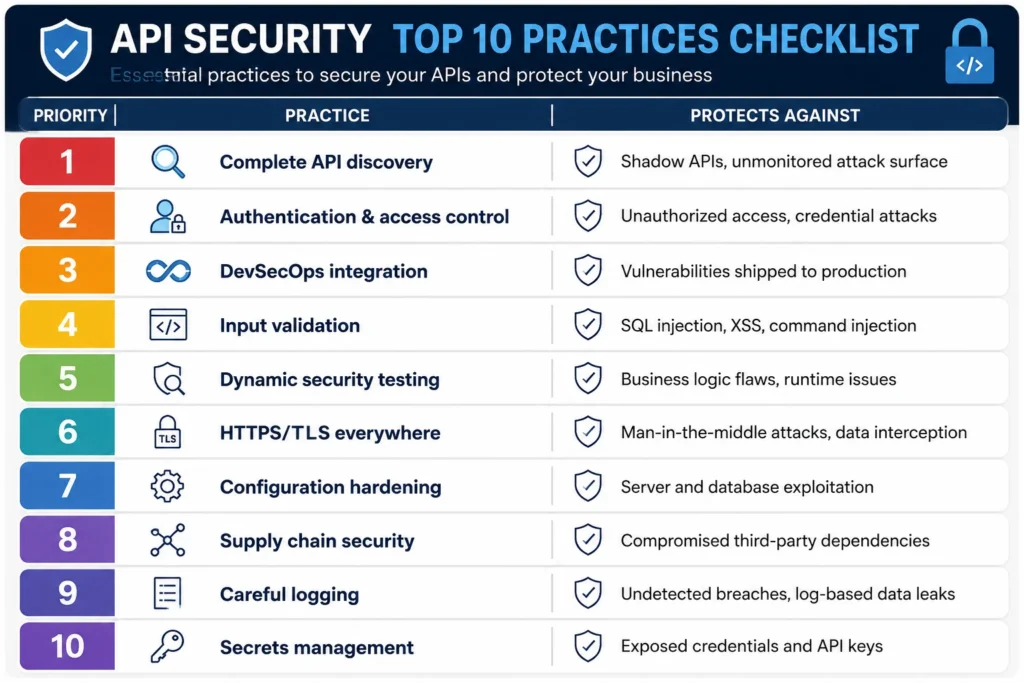
| # | Priority Practice | Protects Against |
|---|---|---|
| 1 | Complete API discovery | Shadow APIs, unmonitored attack surface |
| 2 | Authentication & access control | Unauthorized access, credential attacks |
| 3 | DevSecOps integration | Vulnerabilities shipped to production |
| 4 | Input validation | SQL injection, XSS, command injection |
| 5 | Dynamic security testing | Business logic flaws, runtime issues |
| 6 | HTTPS/TLS everywhere | Man-in-the-middle attacks, data interception |
| 7 | Configuration hardening | Server and database exploitation |
| 8 | Supply chain security | Compromised third-party dependencies |
| 9 | Careful logging | Undetected breaches, log-based data leaks |
| 10 | Secrets management | Exposed credentials and API keys |
Conclusion
Building a genuinely secure web application requires implementing continuous security practices that scale alongside your development process — not a single security review completed once before launch and then forgotten.
Furthermore, the ten practices in this guide — from complete API discovery through careful secrets management — address the vulnerabilities that attackers actually exploit most frequently in real-world breaches. Moreover, none of these practices work well in isolation; they compound together, with each one closing gaps that the others alone would leave exposed.
Therefore, whether you are building a new application from scratch or auditing an existing one, work through these ten practices systematically, starting with API discovery and authentication before moving toward supply chain security and secrets management. Consequently, your web application becomes genuinely resilient against the threats that matter most — protecting both your users’ data and your organization’s reputation for the long term.
Frequently Asked Questions (FAQs)
What are the most important security requirements for a modern web application?
The most important requirements are strong authentication and access control, comprehensive data encryption both at rest and in transit, thorough input validation on every endpoint, and dedicated API security including rate limiting and proper authentication. Furthermore, these four foundations address the vast majority of vulnerabilities that attackers actually exploit in real-world breaches.
How do I secure APIs specifically, beyond general web application security?
API-specific security requires implementing OAuth 2.0 or JWT-based authentication with proper scope management, rate limiting to prevent abuse, and testing specifically for authorization flaws and excessive data exposure — vulnerabilities unique to API implementations. Furthermore, discovering your complete API landscape, including shadow APIs created outside normal development processes, is essential since you cannot secure what you do not know exists.
Why does input validation matter so much for web application security?
Input validation prevents injection attacks and cross-site scripting, both of which let attackers execute arbitrary code or access sensitive data directly through your application. Furthermore, since these vulnerabilities remain among the most common and most damaging across web applications generally, consistent validation on every endpoint — not just obvious user-facing forms — closes one of the largest attack surfaces available to attackers.
Is HTTPS really necessary for internal or non-sensitive applications?
Yes — genuinely. Furthermore, HTTPS has become a standard expectation even for applications not obviously handling sensitive data, and internal APIs assumed “safe” simply because they stay within an internal network remain vulnerable to interception if left unencrypted. Consequently, enforcing HTTPS consistently across every endpoint, internal and external alike, closes this commonly overlooked gap.
How often should dependencies and third-party libraries be updated for security?
Regularly, but with balanced testing — update dependencies to receive security patches promptly while testing thoroughly to ensure updates do not introduce breaking changes or new vulnerabilities of their own. Furthermore, pinning dependencies to specific verified versions, combined with automated vulnerability scanning in your CI/CD pipeline, catches problems before they reach production without requiring you to update reactively after an incident occurs.