Picture this. A customer visits your WooCommerce store at 11 PM with a product question. Nobody is available to answer. They leave. They buy from a competitor who had a chatbot answering questions instantly.
This happens to online stores every single night.
Traditional customer support has a fundamental problem — it only works when people are working. Furthermore, hiring live chat agents for round-the-clock coverage costs far more than most small and medium eCommerce businesses can justify. Consequently, customers leave with unanswered questions and stores lose sales that were genuinely within reach.
AI chatbots solve this problem completely.
An AI chatbot handles customer questions, recommends products, recovers abandoned carts, and tracks orders — automatically, at any hour, without human involvement. Moreover, modern AI chatbots powered by OpenAI and Google Gemini understand natural conversation rather than forcing customers through rigid menu trees.
In this guide, we cover everything you need to know about AI chatbots for WooCommerce — what they do, why they matter, which plugin to use, and how to add one to your store today.
What Is an AI Chatbot for WooCommerce?
An AI chatbot for WooCommerce is a plugin that adds intelligent, automated conversation capability to your online store. Furthermore, it uses artificial intelligence — either built-in models or integrations with OpenAI, Google Gemini, or Dialogflow — to understand customer messages and respond naturally.
Unlike basic rule-based chatbots that only follow pre-set scripts, AI-powered chatbots understand intent. A customer who types “do you have blue running shoes in size 9?” gets a direct product response — not a menu asking them to choose from categories.
What an AI Chatbot Can Do for Your Store
✅ Answer product questions instantly — 24 hours a day, 7 days a week
✅ Help customers search and find products through conversation
✅ Show order status and tracking information automatically
✅ Recover abandoned carts with timely follow-up messages
✅ Recommend related products based on browsing behavior
✅ Qualify leads and collect customer contact details
✅ Hand off complex queries to human agents when needed
Moreover, the best WooCommerce chatbot plugins require zero coding to set up. Consequently, store owners with no technical background add professional AI chat to their stores in under an hour.
Why AI Chatbots Matter for eCommerce
The Problem with Traditional Customer Support
Traditional live chat has three fundamental limitations that hurt eCommerce businesses.
First, it only works during business hours. Furthermore, a significant portion of online shopping happens in evenings and weekends — exactly when most support teams are unavailable. Consequently, customers who need help during off-hours leave without buying.
Second, scaling live chat requires hiring more agents. As your store grows, your support costs grow proportionally. Moreover, training new agents, managing shift schedules, and handling peak periods consistently challenges small business owners.
Third, response time expectations have shortened dramatically. Customers now expect answers within seconds — not minutes. Furthermore, a chat widget that shows “Typically replies in a few hours” actively drives visitors away rather than building confidence.
AI Chat Changes the Economics of Customer Support
They operate continuously without staffing costs. Furthermore, they handle hundreds of simultaneous conversations without performance degradation. Moreover, they respond in seconds regardless of time zone or traffic volume. Consequently, the support experience your customers get at 2 AM matches exactly what they get at 2 PM.
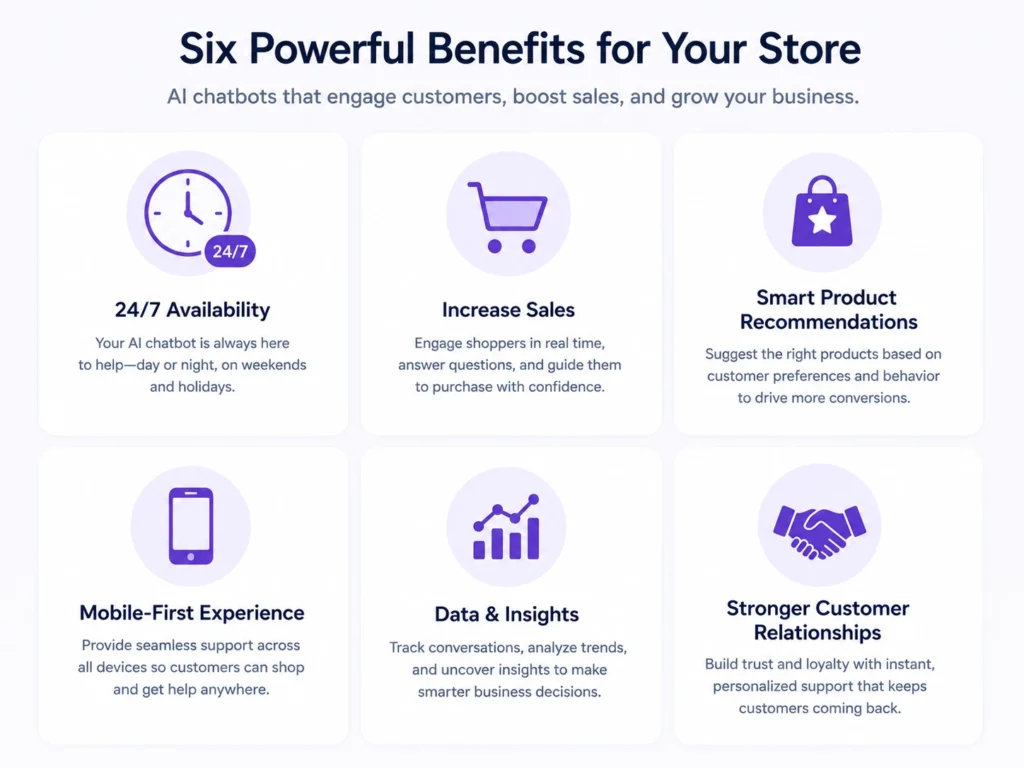
6 Key Benefits of AI Chatbots for WooCommerce Stores
Benefit 1: Round-the-Clock Customer Support
An AI chatbot handles every customer question at any hour without human involvement. Furthermore, it answers product specifications, sizing questions, return policies, and shipping information from your store’s actual data — not generic responses. Consequently, customers get accurate, helpful answers whether they shop at noon or midnight.
Benefit 2: Intelligent Product Search and Recommendations
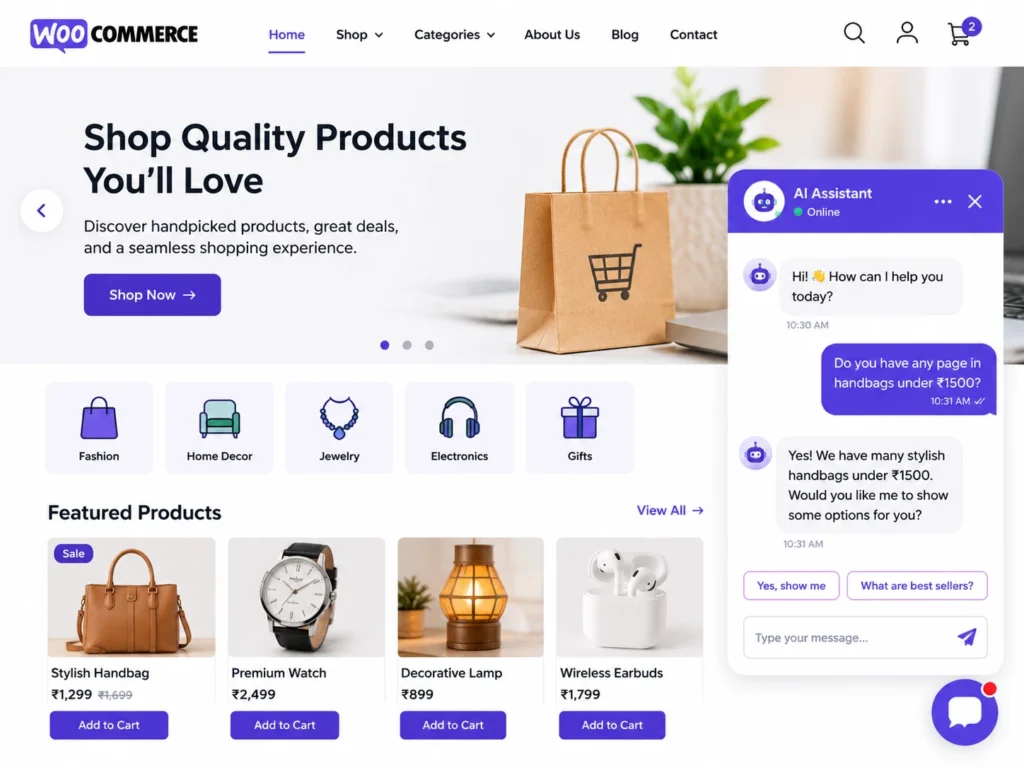
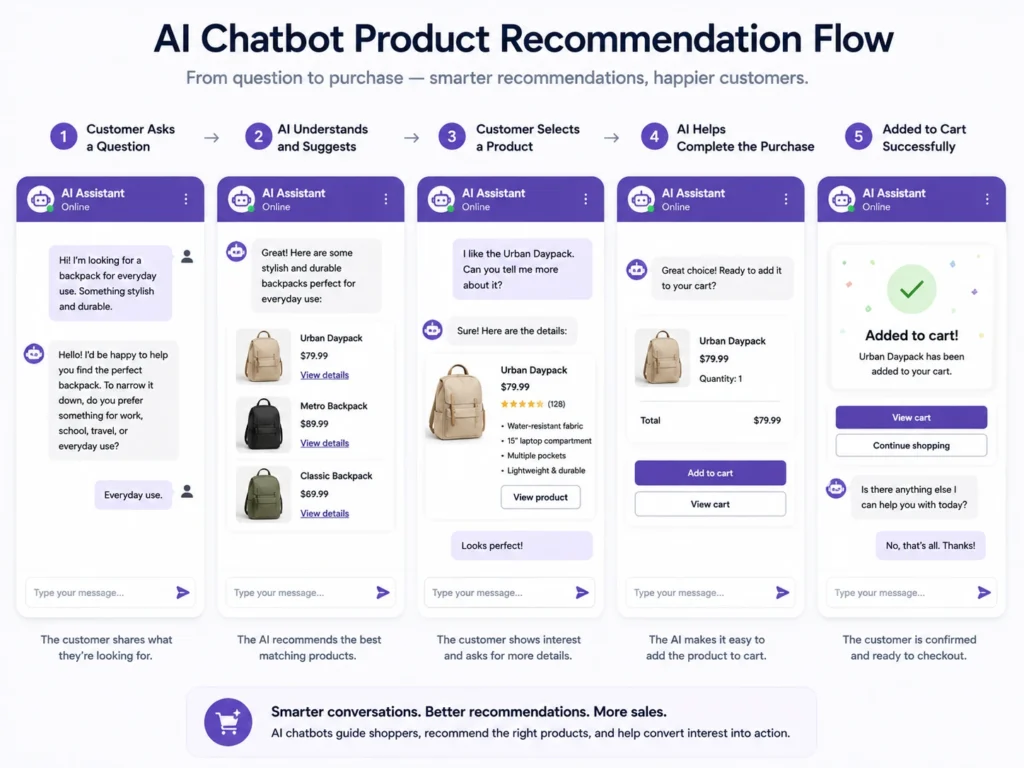
Customers often know what they want but struggle to find it in your catalog. Furthermore, an AI chatbot lets them describe what they need in plain language — “I want a gift for my dad under ₹2,000” — and receive immediate, relevant product suggestions.
Moreover, AI chatbots track what customers browse and view during their session. Consequently, they proactively recommend complementary products — increasing average order value without aggressive upselling that feels pushy.
Benefit 3: Cart Abandonment Recovery
Cart abandonment is one of the biggest revenue leaks in eCommerce. Furthermore, studies consistently show that more than 70% of shoppers who add items to a cart leave without completing their purchase.
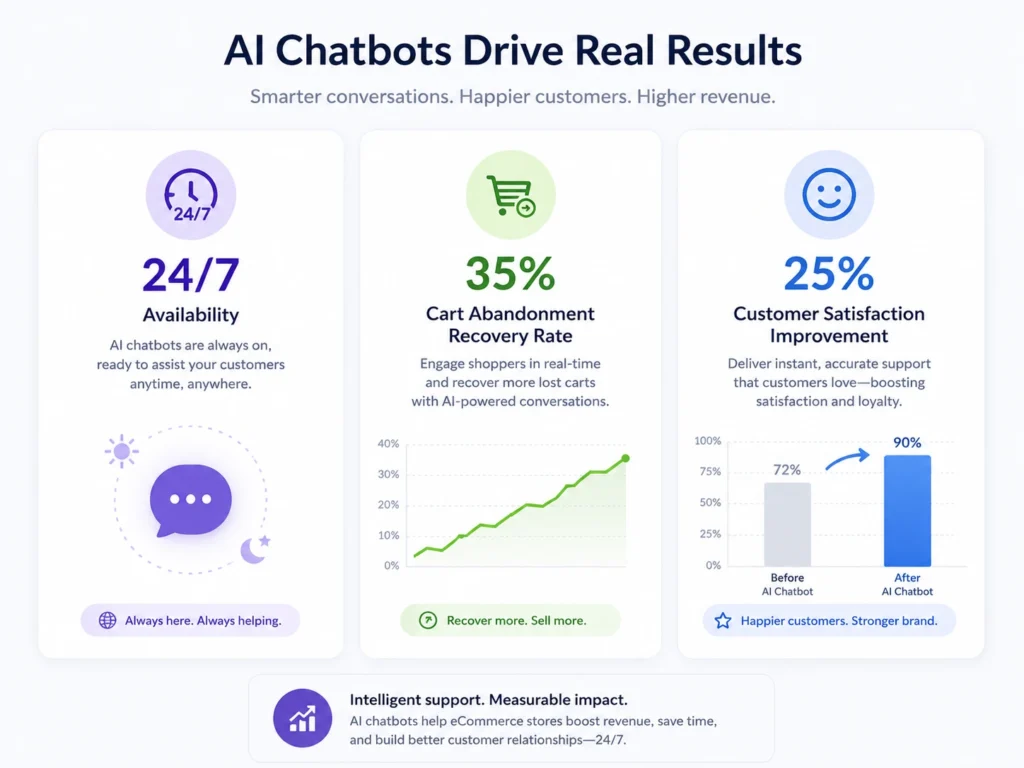
AI chatbots address this directly. When a customer lingers on the checkout page without completing their order, the chatbot can proactively engage — asking if they need help, addressing common hesitations, or offering a small incentive. Consequently, stores with active AI chatbots consistently recover a meaningful percentage of sales that would otherwise be lost permanently.
Benefit 4: Enhanced Mobile Shopping Experience
Mobile shoppers browse differently from desktop users. They want faster answers and simpler navigation. Furthermore, typing a question into a chat window feels more natural on a smartphone than browsing through category filters and dropdown menus.
An AI chatbot provides a conversational shortcut to products, information, and support on mobile. Moreover, it works identically across all devices without requiring separate configuration. Consequently, mobile shoppers get a faster, more satisfying experience that improves conversion rates on your most important traffic source.
Benefit 5: Lead Qualification and Data Collection
Not every visitor is ready to buy immediately. AI chatbots identify high-intent shoppers through conversation — asking qualifying questions, gauging urgency, and collecting contact details from interested visitors who are not yet ready to purchase.
Furthermore, this information feeds directly into your CRM or email marketing system. Consequently, your marketing team follows up with genuinely interested prospects rather than broadcasting to your entire email list indiscriminately.
Benefit 6: Reduced Support Ticket Volume
Every question your AI chatbot answers is a support ticket your team does not need to handle. Furthermore, common questions — shipping times, return policies, product availability, order status — account for the majority of all customer support inquiries in most eCommerce stores.
By handling these automatically, AI chatbots free your human support team to focus on complex situations that genuinely require human judgment. Moreover, customers get faster answers to routine questions. Consequently, both your team’s efficiency and your customers’ satisfaction improve simultaneously.
AI Chat as a Sales Assistant — Not Just Support
Most store owners think of chatbots as customer service tools. The more accurate framing is this — an AI chatbot is your best-performing sales assistant.
Consider what a great in-store sales assistant does. They greet customers. They ask what the customer is looking for. They suggest products based on needs and budget. Furthermore, they handle objections, answer questions, and guide the customer toward a purchase decision.
An AI chatbot does exactly this — across your entire customer base, simultaneously, without salary or commission.
How AI Chat Drives Revenue Directly
Proactive engagement — Instead of waiting for customers to type a question, AI chatbots initiate conversations at the right moment. When a visitor spends three minutes on a product page without adding to cart, the chatbot asks if they need help. Furthermore, this proactive approach converts visitors who were undecided rather than passively letting them leave.
Cross-selling at the right moment — After a customer adds a product to their cart, the chatbot suggests complementary items. Moreover, these suggestions come from your actual product catalog — not generic recommendations. Consequently, cross-selling feels helpful rather than intrusive.
Objection handling — Customers hesitate for specific reasons — shipping cost, return policy uncertainty, size concerns. Furthermore, an AI chatbot trained on your store’s policies addresses these objections instantly. Consequently, the barrier between “thinking about it” and “buying” disappears for many customers.
WoowBot — The Best AI Chatbot Plugin for WooCommerce
WoowBot is the most widely used AI chatbot plugin for WooCommerce. Furthermore, it works as a native WordPress plugin — meaning it integrates directly with your store’s product catalog, orders, and customer data without requiring external platforms or complex API setup.
What Makes WoowBot Stand Out
Native WooCommerce integration — WoowBot connects directly to your product database. Consequently, customers search your actual inventory through the chat window and see real-time availability, pricing, and product images.
OpenAI and Gemini integration — The Pro version connects to OpenAI (ChatGPT) and Google Gemini for natural language understanding. Furthermore, you train the AI on your website and product data — making responses specific to your store rather than generic.
No coding required — Setup involves installing the plugin and configuring basic settings through your WordPress dashboard. Moreover, the free version works out of the box without any API keys or technical configuration.
Multiple AI model support — Beyond OpenAI and Gemini, WoowBot supports OpenRouter and Google Dialogflow. Consequently, you choose the AI model that best fits your budget and capability requirements.
WoowBot Free vs Pro Features
| Feature | Free | Pro |
|---|
| Product search via chat | ✅ | ✅ |
| 24/7 automated responses | ✅ | ✅ |
| OpenAI / Gemini integration | ❌ | ✅ |
| Order status tracking | ❌ | ✅ |
| Cart abandonment recovery | ❌ | ✅ |
| Custom AI training on your data | ❌ | ✅ |
| Live agent handoff | ❌ | ✅ |
| Multi-language support | ❌ | ✅ |
The free version handles basic product search and customer inquiry routing effectively. Furthermore, the Pro version transforms the chatbot into a full AI sales and support assistant trained specifically on your store.
AI vs Human Input: Finding the Right Balance for WordPress Success
The integration of AI in WordPress has revolutionized content creation, SEO optimization, design, and customer interactions. AI-powered tools like ChatGPT, RankMath, and Elementor AI help automate tasks, saving time and improving efficiency. These tools assist in generating content, analysing keyword trends, and even designing websites without coding expertise. However, while AI enhances productivity, relying solely on automation can lead to generic content, lack of emotional engagement, and potential SEO penalties.
Human input remains crucial for creativity, personalization, and strategic decision-making. While AI can generate text, it often lacks the storytelling depth and authenticity needed to connect with audiences. Designers and marketers bring unique branding, emotional intelligence, and audience engagement strategies that AI cannot replicate. The best approach is a hybrid model—using AI for automation while ensuring human oversight in refining content, optimizing design, and making data-driven decisions. This balance ensures a successful WordPress site that is both efficient and engaging for users.
How to Add an AI Chatbot to Your WooCommerce Store
Adding WoowBot to your WooCommerce store takes under 30 minutes from start to finish.
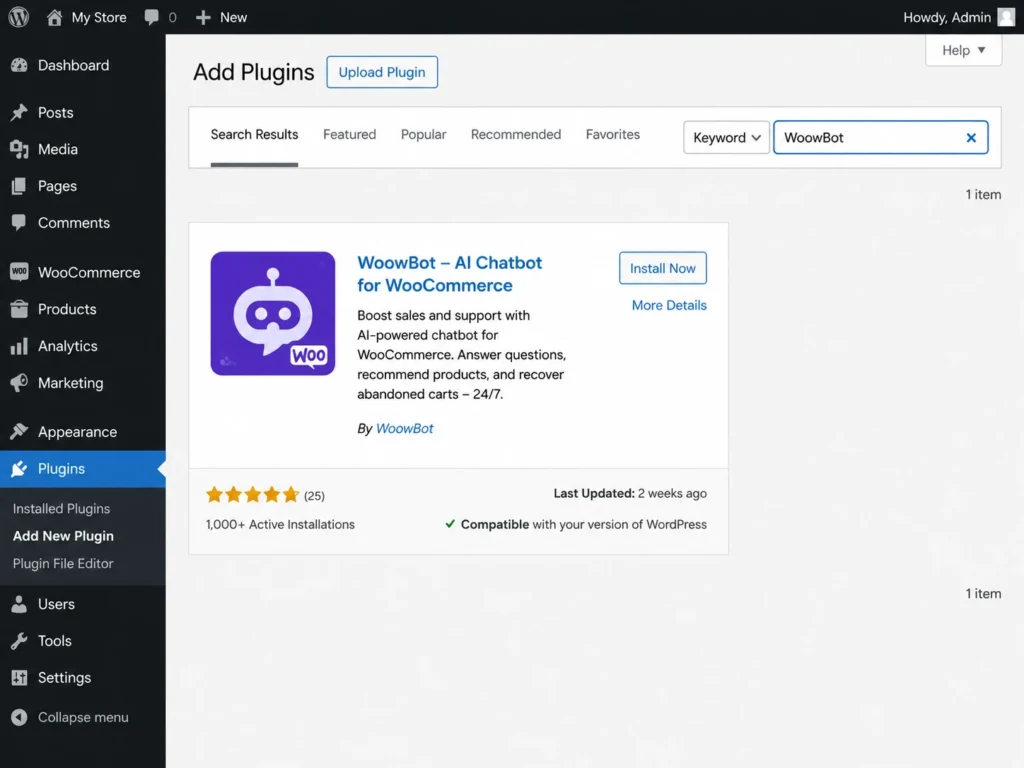
Go to your WordPress Dashboard → Plugins → Add New Plugin. Furthermore, search for “WoowBot WooCommerce ChatBot” and click Install Now. After installation completes, click Activate.
Step 2: Configure Basic Settings
After activation, navigate to WoowBot in your WordPress sidebar. Furthermore, the settings panel lets you customize the chat window color, position, greeting message, and bot name. Set these to match your brand identity — a chatbot that looks like part of your store builds more trust than a generic widget.
Step 3: Connect Your AI Model (Pro)
For AI-powered natural language responses, connect WoowBot to OpenAI or Google Gemini through the integration settings. Furthermore, enter your API key from your chosen provider and configure the response style — formal, friendly, or casual — to match your brand voice.
Step 4: Train the AI on Your Store Data
The Pro version allows you to train the AI on your product descriptions, FAQs, shipping policies, and return guidelines. Consequently, the chatbot answers store-specific questions accurately rather than giving generic responses.
Step 5: Test Before Going Live
Test your chatbot by asking the same questions your customers typically ask. Furthermore, check product search results, policy questions, and edge cases where customers might phrase things unusually. Consequently, catching gaps in your chatbot’s knowledge before customers encounter them prevents frustrating experiences.
What to Expect After Adding a Chatbot
Most WooCommerce store owners notice specific improvements within the first few weeks of running an AI chatbot.
Support load decreases. Common questions stop reaching your inbox because the chatbot handles them automatically. Furthermore, your team focuses on genuinely complex situations rather than answering the same questions repeatedly.
Engagement increases. Visitors who previously browsed and left silently now interact. Moreover, engaged visitors convert at significantly higher rates than passive browsers. Consequently, your conversion rate improves without changing your product prices or marketing spend.
Off-hours sales appear. Orders placed between 10 PM and 8 AM become more common. Furthermore, these are sales that simply would not have happened without a chatbot available to answer the questions that previously blocked late-night shoppers from completing purchases.
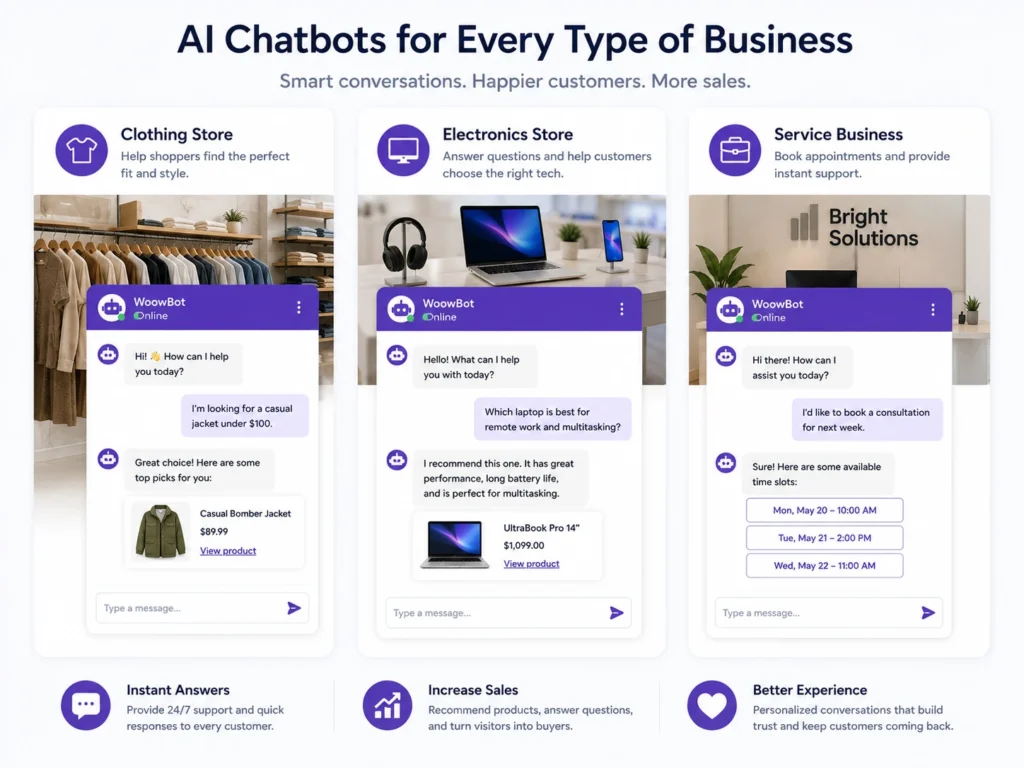
Who Needs an AI Chatbot for Their WooCommerce Store?
Small and Medium eCommerce Stores
Stores with limited support staff benefit most from AI chatbots because they extend support capability without adding headcount. Furthermore, a solo store owner running their business while working another job simply cannot answer customer questions in real time throughout the day.
Stores with Large Product Catalogs
Customers shopping large catalogs need help finding specific products quickly. Moreover, conversational search through an AI chatbot is faster and more intuitive than category navigation for many shoppers. Consequently, stores with 100+ products see the greatest product discovery benefits from chatbot implementation.
WooCommerce Stores Targeting International Customers
Customers in different time zones need support during their local business hours — which may be your off-hours. Furthermore, multi-language AI chatbot support serves international customers in their preferred language without requiring multilingual staff. Consequently, international expansion becomes more viable for small stores that previously could not staff global support hours.
Conclusion
Customer expectations have changed permanently. Visitors expect instant answers, personalized recommendations, and seamless support — at any hour, on any device.
Traditional live chat and email support cannot meet these expectations cost-effectively for most WooCommerce store owners. Furthermore, every hour your store operates without automated customer engagement is an hour where questions go unanswered and sales go unearned.
AI chatbots close this gap completely. Moreover, plugins like WoowBot make implementation accessible for any store owner — free to start, with powerful Pro features available when your store is ready for them.
Therefore, adding an AI chatbot to your WooCommerce store is not a future consideration. It is a present opportunity that improves customer experience, reduces support burden, and generates sales your store is currently missing every single day.
Frequently Asked Questions (FAQs)