Someone asks for your website URL and you hesitate before sharing it. Maybe you add a disclaimer — “It’s a bit outdated, we’re working on it.” Furthermore, you have been saying that for over a year.
Or perhaps your website looks fine to you, but your analytics tell a different story. Visitors arrive and leave within seconds. Contact form submissions have slowed. Competitors with inferior products are somehow outranking you in Google.
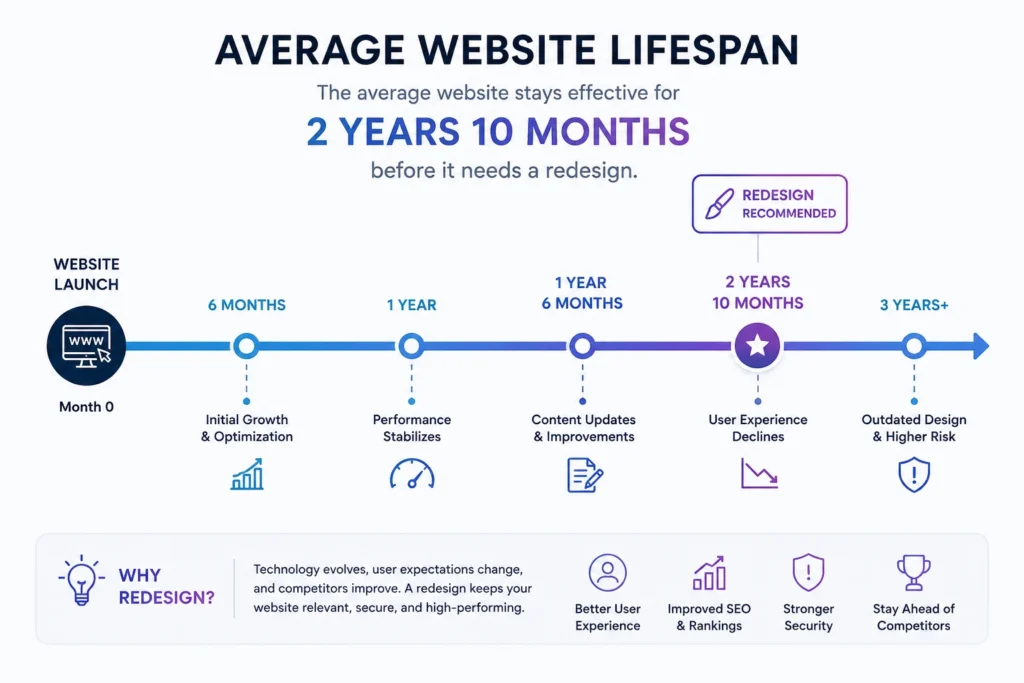
According to research by Orbit Media, the average website gets redesigned every 2 years and 10 months. Furthermore, businesses that wait longer than that consistently see measurable declines in traffic, leads, and conversions. Consequently, a website that was strong at launch becomes a liability as design trends evolve, technology changes, and visitor expectations shift.
In this guide, we cover 10 clear signs your WordPress website needs a redesign, what to do before you start, and how to protect your SEO rankings throughout the process.
How Do You Know It's Time?
Most business owners avoid the redesign conversation because it feels expensive and disruptive. Furthermore, it is easy to rationalize — “the website still works, we’ll get to it later.”
However, the hidden cost of waiting is measurable. Studies show that well-designed, modern websites convert at 4.3%, while outdated sites with poor user experience convert at 0.8% or below. Consequently, a business generating 1,000 monthly visitors loses significant revenue every month it delays a necessary redesign.
The question is not whether you will eventually redesign your WordPress website. It is whether you will do it proactively — on your terms — or reactively, after the performance decline becomes impossible to ignore.
10 Clear Signs Your WordPress Website Needs a Redesign
1: Your Website Is Not Mobile-Responsive
Over 60% of web traffic now comes from mobile devices. Furthermore, Google uses mobile-first indexing — your mobile experience determines your search rankings, not your desktop design. Consequently, a website that breaks, requires pinching to zoom, or shows horizontal scroll bars on smartphones is actively losing both visitors and search visibility every single day.
Test your website on your own smartphone right now. If anything looks wrong — text too small, buttons too close together, images overflowing the screen — a redesign is not optional. It is urgent.
2: Your Bounce Rate Is Above 70%
Bounce rate measures the percentage of visitors who arrive on your website and leave without taking any action. Furthermore, a bounce rate above 70% tells you that most visitors are not finding what they expected or hoped to find.
High bounce rates have several common causes — slow loading speed, confusing navigation, outdated design that signals low credibility, or content that does not match what search engines told visitors to expect. Moreover, each of these causes independently harms your Google rankings through increased bounce rate signals. Consequently, a persistently high bounce rate is both a symptom and a cause of declining search performance.
Check your Google Analytics for pages with the highest bounce rates. Furthermore, pay particular attention to your homepage and top landing pages — these deserve priority attention in any redesign.
3: Your Website Loads Slowly
Visitors abandon websites that take more than three seconds to load. Furthermore, Google directly penalizes slow websites through Core Web Vitals assessment — measuring Largest Contentful Paint, Cumulative Layout Shift, and Interaction to Next Paint as ranking factors.
Slow WordPress websites often suffer from accumulated technical debt — outdated themes with bloated code, too many poorly coded plugins, unoptimized images, and hosting that has become inadequate as the site has grown. Moreover, individual performance fixes help temporarily but sometimes a full redesign with a clean, lightweight theme and optimized architecture delivers lasting speed improvements that incremental fixes cannot achieve.
Run your website through Google PageSpeed Insights. Consequently, if your mobile score is below 50, a redesign should be part of your performance recovery plan.
4: Your Design Looks Visually Outdated
Design trends evolve. Furthermore, what looked professional three years ago often signals neglect and low credibility today — even if the underlying content is excellent.
Specific outdated design signals visitors recognize immediately — stock photos of people in suits shaking hands, cluttered sidebars with too many widgets, text-heavy pages without visual breathing room, and color schemes that feel dated. Moreover, visitors make trust judgments about your business within 0.05 seconds of arriving on your website — faster than they can read a single word.
Your website’s visual quality directly affects how much visitors trust your business. Consequently, an outdated design does not just look bad — it costs real conversions by undermining credibility before visitors engage with your content.
5: Your Website Is Hard to Navigate
Navigation problems reveal themselves in two ways. First, visitors tell you directly through feedback or support requests. Second, your analytics show high exit rates on pages that should logically lead to further engagement.
Common navigation problems include menus with too many items competing for attention, inconsistent naming that confuses visitors about where specific content lives, and missing pathways between related content. Furthermore, a visitor who cannot find what they need within two or three clicks leaves — and rarely returns.
Moreover, navigation that worked for a small initial website often becomes confusing as content grows over time. Consequently, a redesign creates an opportunity to restructure your site architecture around how current visitors actually think rather than how you originally organized things.
6: Your Website Is Not Generating Leads or Enquiries
Your website has one primary job — generate business results. Furthermore, if it consistently fails to do that, design and content problems are almost always involved.
Low lead generation typically points to several specific issues — unclear calls to action that do not tell visitors what to do next, contact forms that feel too long or complicated, a lack of trust signals (testimonials, case studies, certifications), or landing pages that fail to match visitor expectations set by ads or search results.
Moreover, businesses sometimes report that their website “gets traffic but no leads” — which means the conversion architecture needs rebuilding, not just cosmetic updates. Consequently, this situation specifically calls for a strategic redesign rather than minor visual tweaks.
7: Your Business Has Changed
Most websites are designed for the business as it existed at launch. Furthermore, businesses evolve — new services get added, target audiences shift, brand positioning changes, and sometimes the core product offering transforms entirely.
A website that no longer accurately represents your current business actively confuses potential customers. Moreover, visitors who cannot quickly understand exactly what you do and who you serve leave without engaging — even when your actual offering is exactly what they need. Consequently, any significant business change justifies evaluating whether your website still serves your current goals effectively.
8: Your Competitors Have Better Websites
Visitors compare websites constantly — often within the same browsing session. Furthermore, if potential customers visit your website after seeing a competitor’s modern, well-designed site, the contrast works against you regardless of how strong your actual products or services are.
Search your primary keywords and honestly assess how your website compares visually and functionally to the top results. Moreover, pay particular attention to mobile experience, loading speed, and the clarity of value propositions. Consequently, if competitors consistently present better digital experiences, they are converting potential customers who would otherwise choose you based on actual capability.
9: Your Website Has Technical Problems
Broken links, missing images, plugin conflicts causing white screens, forms that do not submit correctly, and checkout errors all send a single message to visitors — this business does not care enough to fix basic problems.
Furthermore, accumulated technical debt becomes harder to fix incrementally as it grows. Old WordPress themes lose compatibility with current plugin versions. Plugins abandoned by developers create security vulnerabilities. Moreover, the energy spent maintaining a problematic website often exceeds what a clean rebuild would cost. Consequently, reaching a threshold of recurring technical problems signals that a systematic redesign addresses root causes more effectively than endless patching.
10: You Are Embarrassed to Share Your URL
If you hesitate before giving someone your website address, add disclaimers when sharing it, or avoid mentioning it in professional contexts — trust that feeling. Furthermore, your instinct that the website does not represent you well is almost certainly accurate.
Your website is your most visible business asset. Moreover, every person you meet, every email you send, and every marketing campaign you run potentially directs people to it. Consequently, embarrassment about your website is not a minor cosmetic concern — it is a signal that your most important sales and credibility tool is actively working against you.
Redesign vs Refresh — Which Do You Actually Need?
Not every website problem requires a complete rebuild. Understanding the difference saves both time and budget.
| Situation | Recommendation |
|---|
| Outdated visuals only | Refresh — new theme, updated colors |
| Navigation and structure problems | Redesign — rebuild site architecture |
| Brand pivot or new positioning | Redesign — strategy changes first |
| Speed and performance issues | Often fixable without full redesign |
| Not generating leads | Redesign — conversion architecture rebuild |
| Business changed significantly | Redesign — align with current goals |
| Major technical problems | Redesign — clean slate more efficient |
Furthermore, a refresh updates visual elements — colors, fonts, images, and layout — while keeping existing content and structure. A redesign rebuilds strategy, structure, and content from the ground up. Consequently, choosing the right approach based on your specific problems prevents overspending on a full rebuild when targeted updates would suffice.
5 Things to Do Before You Redesign
Step 1: Back Up Everything
Before touching your existing WordPress website, create a complete backup — files, database, and media library. Furthermore, store the backup in a location separate from your hosting server. Consequently, you have a complete recovery option if anything goes wrong during the redesign process.
Step 2: Set Up a Staging Environment
Never redesign directly on your live website. Furthermore, most quality WordPress hosting providers include staging environments where you build and test the new design before making it public. Consequently, visitors see your existing website without interruption while you build and refine the redesign separately.
Step 3: Document Your Current SEO Performance
Before making any changes, export a complete list of your current ranking pages, their URLs, and their search positions from Google Search Console. Furthermore, this document becomes essential for setting up 301 redirects if any URLs change during the redesign. Consequently, you protect the search rankings your existing content has earned rather than starting organic traffic from zero.
Step 4: Define Clear Goals for the New Design
Every redesign decision should connect to a specific business goal. Furthermore, “looks better” is not a goal — “increases contact form submissions by 30%” is. Moreover, clear measurable goals let you evaluate whether the redesign succeeded after launch. Consequently, redesigns with defined success metrics produce better results than those driven purely by aesthetic preferences.
Step 5: Audit Your Existing Content
Not all existing content deserves to carry forward into the new design. Furthermore, identify your highest-performing pages and preserve them carefully. Moreover, identify thin, outdated, or duplicate content that should be updated or removed. Consequently, the new website launches with a cleaner, stronger content foundation rather than simply displaying old problems in a newer design.
How to Protect Your SEO During a WordPress Redesign
Losing search rankings during a redesign is the most common and costly mistake website owners make. Furthermore, it is entirely preventable with proper planning.
Set up 301 redirects for every changed URL. If any page URL changes during the redesign, create a permanent redirect from the old address to the new one. Moreover, 301 redirects transfer approximately 90% of the original page’s ranking authority to the new URL. Consequently, search rankings recover quickly rather than starting from zero.
Keep your best-performing content. Your top-ranking pages have earned their position through content quality, backlinks, and time. Furthermore, preserve their URL structure wherever possible and carry their content forward — improved and updated, not deleted or replaced.
Submit your updated sitemap to Google Search Console immediately after launch. Furthermore, monitor Search Console daily for the two weeks following launch to catch any indexing errors or crawl problems quickly. Consequently, addressing issues within days of launch minimizes their impact on rankings.
Conclusion
The businesses that redesign proactively — before their website becomes a visible problem — spend less, lose fewer opportunities, and maintain competitive positioning throughout the process.
Furthermore, waiting until your website is embarrassing, your rankings have collapsed, or your competitors have obviously passed you means redesigning from a position of weakness rather than strength.
If three or more of the ten signs in this guide apply to your current WordPress website, the right time to start planning a redesign is now. Moreover, the 5-step preparation process ensures your redesign protects existing SEO value rather than sacrificing it for a fresh start.
Consequently, approach your redesign with clear goals, proper planning, and a realistic budget — and your new WordPress website will outperform the old one from launch day rather than spending months recovering from an avoidable decline.
Frequently Asked Questions (FAQs)