Open Google PageSpeed Insights and test your WordPress website right now.
Most website owners are surprised by what they find. Furthermore, a site that feels fast while browsing in your own browser often scores poorly on real performance tests. Consequently, visitors on mobile networks, slower devices, or different geographic locations experience something completely different from what you see on your desk.
Page speed affects everything that matters — Google search rankings, visitor bounce rates, conversion rates, and ultimately revenue. Moreover, Google now measures your mobile performance first through Core Web Vitals. Therefore, a slow WordPress website loses search visibility regardless of how strong your content or backlinks are.
The most effective solution most WordPress developers recommend? WP Rocket.
Over 5.47 million websites use WP Rocket for speed optimization. Furthermore, activating WP Rocket immediately applies 80% of web performance best practices without touching a single setting. Consequently, it delivers faster results than any free caching plugin available.
In this guide, we cover everything you need to know about WP Rocket — what it does, how its settings work, what it costs, and whether it is the right choice for your WordPress website.
What is WP Rocket?
WP Rocket is a premium WordPress caching and performance plugin. It speeds up your website by storing static versions of your pages, optimizing your files, and reducing the number of requests your server handles for each visitor.
Unlike free caching plugins that require complex manual configuration, WP Rocket works intelligently from the moment you activate it. Furthermore, it automatically enables page caching, browser caching, and GZIP compression on installation — without any setup required from you.
- 5.47 million+ websites actively use WP Rocket
- 80% of best practices applied automatically on activation
- 92% customer happiness score from verified reviews
- 3 minutes average setup time for most websites
- Used by major brands, agencies, and individual bloggers worldwide
Why WP Rocket Stands Apart from Free Plugins
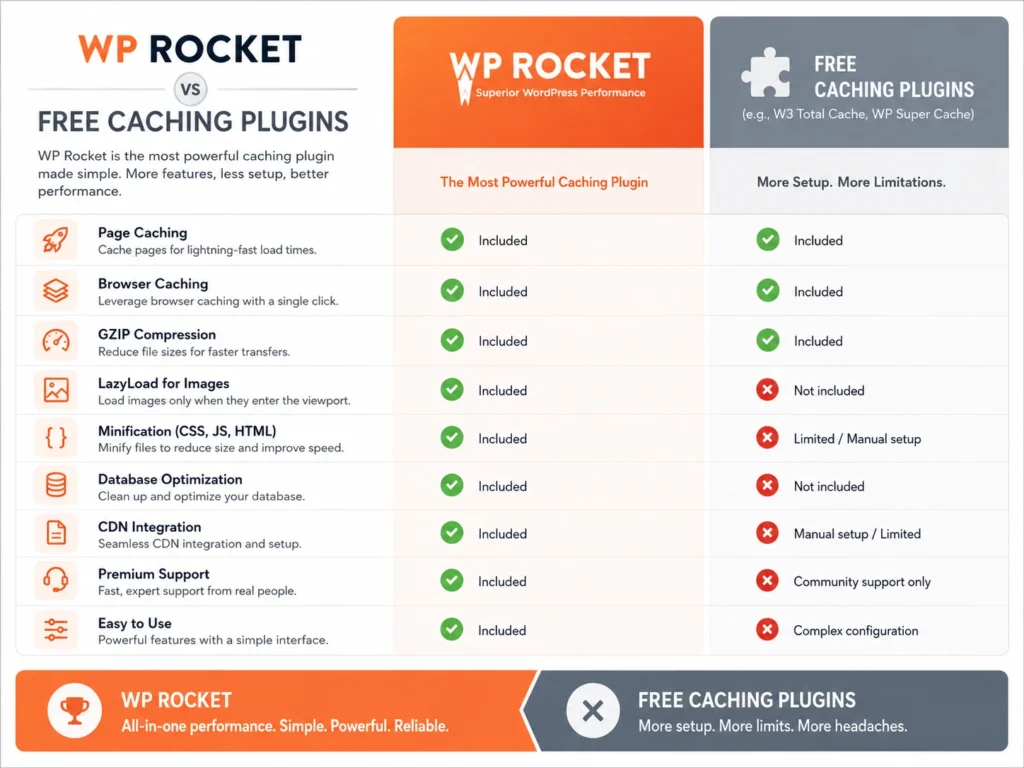
Free caching plugins exist — W3 Total Cache, WP Super Cache, and LiteSpeed Cache are all popular options. However, there are genuine reasons why millions of website owners pay for WP Rocket instead.
Immediate Results Without Configuration
Free plugins require significant manual setup to reach their full potential. Furthermore, incorrect settings in free caching plugins regularly break websites — white screens, missing CSS, and checkout errors are common complaints.
WP Rocket activates and immediately starts improving performance. Moreover, its default settings are sensible and safe — meaning it rarely breaks anything out of the box. Consequently, non-technical website owners achieve professional results without needing developer assistance.
eCommerce-Specific Optimizations
WP Rocket includes dedicated WooCommerce optimizations built into its core. Furthermore, it automatically excludes cart, checkout, and account pages from caching — preventing the broken cart totals and checkout errors that plague poorly configured free plugins.
Rocket Insights Performance Hub
WP Rocket’s Rocket Insights dashboard tracks your Core Web Vitals performance over time. Moreover, it identifies specific improvements your website needs and shows measurable progress after each optimization you make. Consequently, you make data-driven speed decisions rather than guessing what works.
WP Rocket Key Features
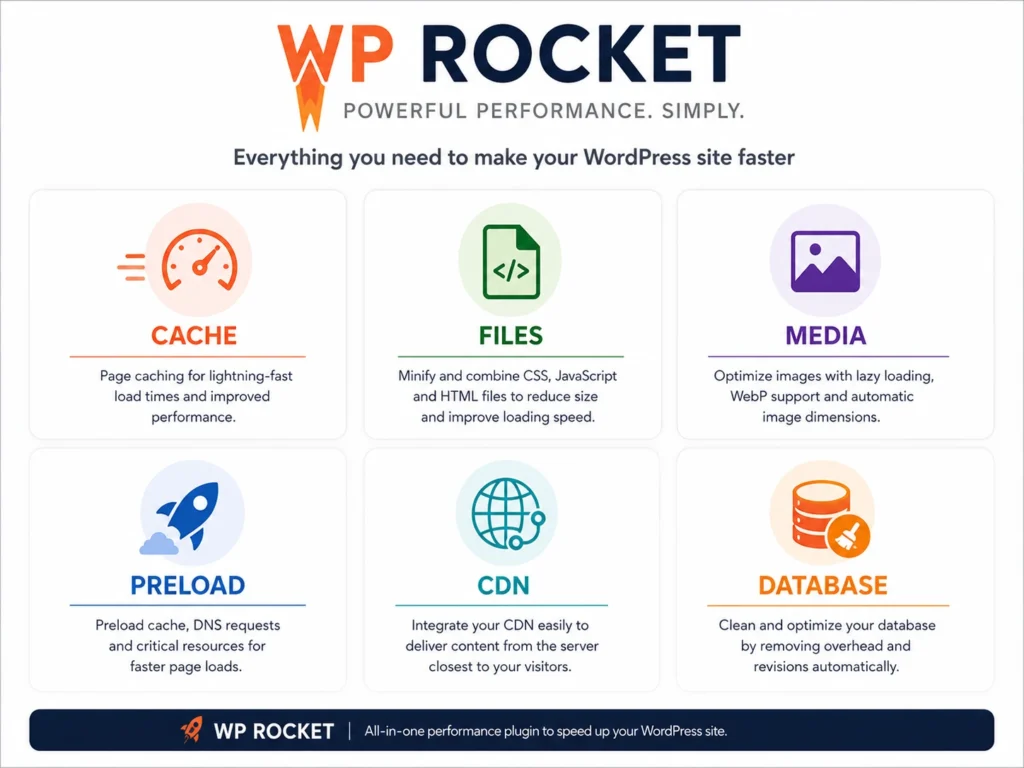
Page caching is WP Rocket’s foundation. Instead of rebuilding each page from your database every time a visitor arrives, WP Rocket serves a pre-built static HTML version. Furthermore, static pages load dramatically faster than dynamically generated ones.
WP Rocket creates separate cache versions for mobile visitors, logged-in users, and different device types. Consequently, every visitor gets a cached experience optimized for their specific situation.
Browser caching instructs visitors’ browsers to store static files — CSS, JavaScript, fonts, and images — locally on their device. Furthermore, returning visitors load your pages significantly faster because their browser already has these files saved. Consequently, second and third visits feel almost instant.
WP Rocket minifies your CSS, JavaScript, and HTML files — removing unnecessary spaces, comments, and characters that browsers do not need. Furthermore, it combines multiple CSS and JavaScript files into fewer requests, reducing the number of server round trips each page requires.
Moreover, WP Rocket defers JavaScript loading — preventing scripts from blocking page rendering. Consequently, your Largest Contentful Paint (LCP) score improves directly, which is one of Google’s Core Web Vitals metrics.
Images are the heaviest elements on most web pages. WP Rocket’s lazy loading delays image loading until a visitor scrolls toward them. Furthermore, this dramatically improves the initial page load time that visitors and Google both measure.
Moreover, WP Rocket extends lazy loading to iframes and videos — including YouTube embeds that are notoriously heavy on page weight. Consequently, pages with embedded videos load significantly faster without removing the video content.
WordPress databases accumulate clutter over time — post revisions, expired transients, orphaned metadata, and spam comments. Furthermore, this clutter slows down every database query your website makes.
WP Rocket’s database optimization tool removes this unnecessary data automatically. Moreover, you can schedule automatic database cleanups weekly or monthly. Consequently, your website’s database stays lean and queries run faster without manual intervention.
WP Rocket preloads your cache by crawling your website automatically and generating cached versions of every page. Furthermore, this means the very first visitor to any page gets a cached experience rather than a slow uncached one.
Moreover, WP Rocket preloads your sitemap — crawling every URL listed in your XML sitemap and caching it proactively. Consequently, search engines and real visitors both find fast-loading pages from their very first request.
A Content Delivery Network serves your website files from servers closest to each visitor geographically. WP Rocket integrates with all major CDN providers — Cloudflare, BunnyCDN, RocketCDN, and others.
Furthermore, connecting a CDN through WP Rocket takes minutes rather than the complex configuration most CDN setups require. Consequently, international visitors experience the same fast loading times as local ones.
WP Rocket Settings Guide: Tab by Tab
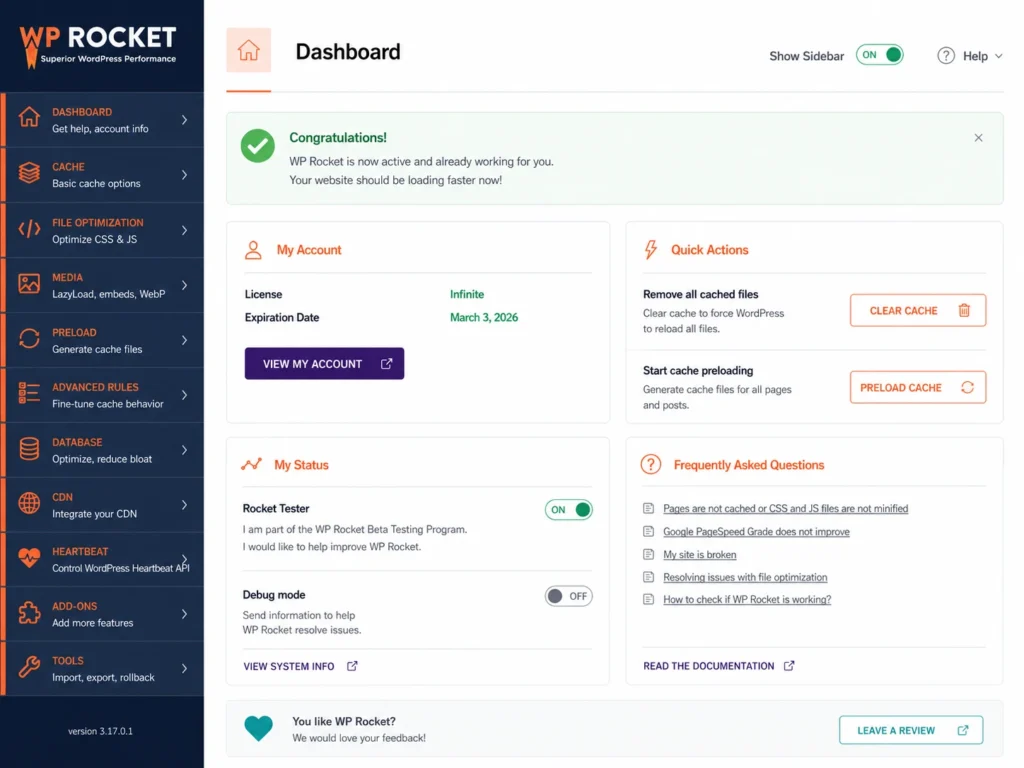
WP Rocket organizes settings into clear tabs. Here is what each tab controls and which settings matter most.
Dashboard Tab
The Dashboard shows your current performance overview and Rocket Insights data. Furthermore, it displays your Core Web Vitals scores and highlights specific improvements available for your website. Check this tab after making any setting changes to see measurable impact.
Cache Tab
Enable caching for mobile devices — Turn this on. Mobile traffic exceeds desktop for most websites, and mobile visitors deserve cached performance equally.
Cache lifespan — How long WP Rocket keeps cached files before refreshing them. 10 hours works well for most websites. Furthermore, blogs that publish several times daily benefit from shorter lifespans — 4 to 6 hours.
User cache — Enable only if your website has logged-in users who see personalized content. Consequently, membership sites and WooCommerce stores with customer accounts benefit from this setting.
File Optimization Tab
Minify CSS — Enable. Reduces CSS file sizes by removing whitespace and comments.
Combine CSS — Enable carefully. Test after enabling because some themes and plugins break when CSS files merge.
Minify JavaScript — Enable. Reduces JS file sizes without affecting functionality.
Load JavaScript deferred — Enable. Prevents render-blocking scripts from delaying your page display. Furthermore, this setting directly improves your LCP score.
Delay JavaScript execution — Enable for better Time to Interactive scores. Moreover, this delays non-critical scripts until after the page has loaded visually.
Media Tab
Enable LazyLoad for images — Always enable. Dramatically improves initial load time.
Enable LazyLoad for iframes and videos — Enable. YouTube embeds are extremely heavy. Furthermore, lazy loading them prevents one embedded video from dominating your entire page’s load time.
Replace YouTube thumbnail — Enable. Replaces the heavy YouTube player with a static thumbnail until a visitor clicks play. Consequently, pages with multiple YouTube embeds load significantly faster.
Image dimensions — Enable. Adds width and height attributes to images, preventing Cumulative Layout Shift (CLS) — another Core Web Vitals metric.
Preload Tab
Activate preloading — Always enable. This is how WP Rocket builds cached versions of your pages proactively.
Preload links — Enable. Begins loading pages in the background when a visitor hovers over a link. Consequently, clicking that link feels nearly instant.
Sitemap-based cache preloading — Enable and enter your sitemap URL. Furthermore, this ensures every page on your website gets cached — not just the ones visitors happen to browse first.
Advanced Rules Tab
This tab lets you exclude specific pages from caching. Furthermore, WooCommerce cart and checkout pages are automatically excluded. Add any other pages that must remain dynamic — membership portals, login pages, or custom dynamic pages.
Database Tab
- Post revisions — WordPress saves every edit as a revision. These accumulate quickly.
- Auto drafts — Removes abandoned draft posts that serve no purpose
- Trashed posts — Empties the trash automatically
- Expired transients — Removes database entries that plugins leave behind
- All transients — More aggressive cleanup for heavily used databases
Schedule automatic cleanup — Set weekly automatic database optimization. Consequently, your database stays clean without remembering to do it manually.
Heartbeat Tab
WordPress’s Heartbeat API sends regular server pings that increase CPU usage unnecessarily on most websites. Furthermore, on shared hosting, excessive Heartbeat activity slows both your website and your WordPress admin dashboard.
Reduce or disable Heartbeat for the frontend entirely. Moreover, reduce the Heartbeat frequency in the backend to every 120 seconds rather than the default 15 seconds. Consequently, server CPU usage drops noticeably on shared and managed hosting environments.
CDN Tab
If you use a CDN service, configure it here. Enter your CDN URL and WP Rocket automatically serves your static files through the CDN for all visitors. Furthermore, RocketCDN is WP Rocket’s own CDN solution available as an add-on for users who want a fully integrated option.
Add-Ons Tab
WP Rocket’s Add-Ons tab shows compatible plugin integrations:
- Cloudflare — Connect your Cloudflare account for direct cache management
- Sucuri — Integration with Sucuri website security
- Varnish — Clear Varnish cache alongside WP Rocket cache on updates
- Google Tracking — Host Google Analytics locally for privacy compliance and speed
WP Rocket Pricing
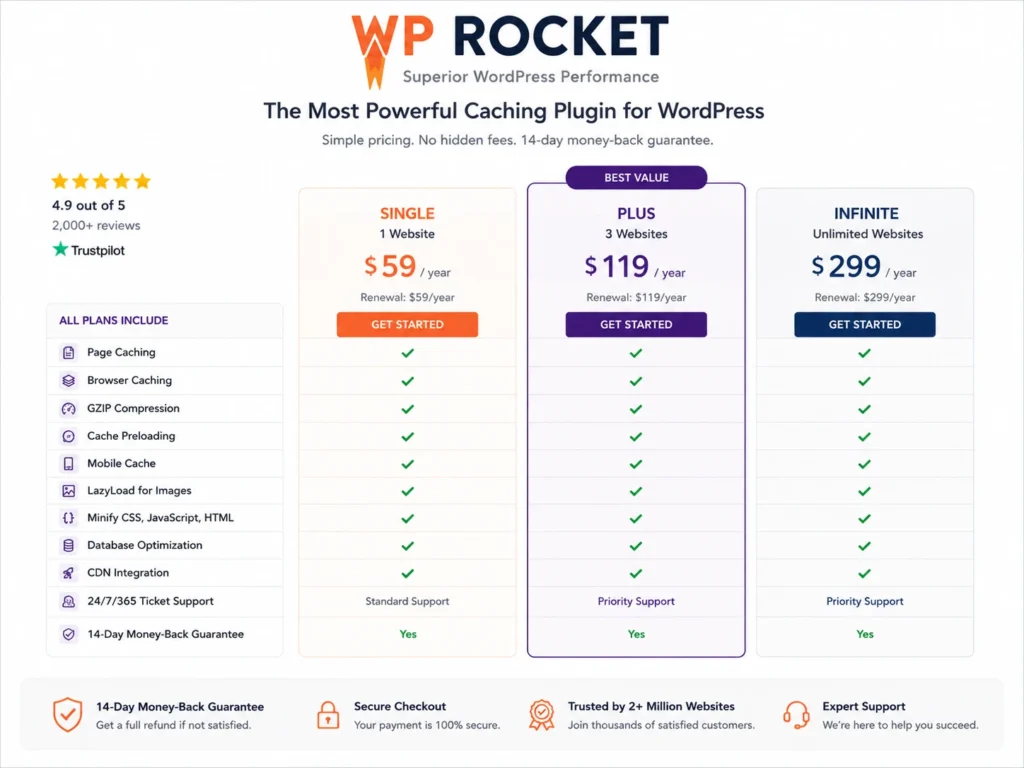
WP Rocket uses annual licensing — you pay once per year and receive updates and support throughout that period.
| Plan | Price | Websites |
|---|
| Single | $59/year | 1 website |
| Plus | $119/year | 3 websites |
| Infinite | $299/year | Unlimited websites |
All three plans include identical features. Furthermore, the only difference is how many websites you can activate the license on. Consequently, agencies and developers with multiple client sites benefit significantly from the Infinite plan’s per-site cost reduction.
Is WP Rocket Worth the Price?
The time saved on configuration compared to free plugins pays for the license cost within the first month. Furthermore, the performance improvements typically translate directly into better search rankings and lower bounce rates. Moreover, improved Core Web Vitals scores benefit sites with Google Ads campaigns through better Quality Scores and lower cost-per-click. Consequently, the $59 annual cost for a single website delivers ROI that most other WordPress investments cannot match.
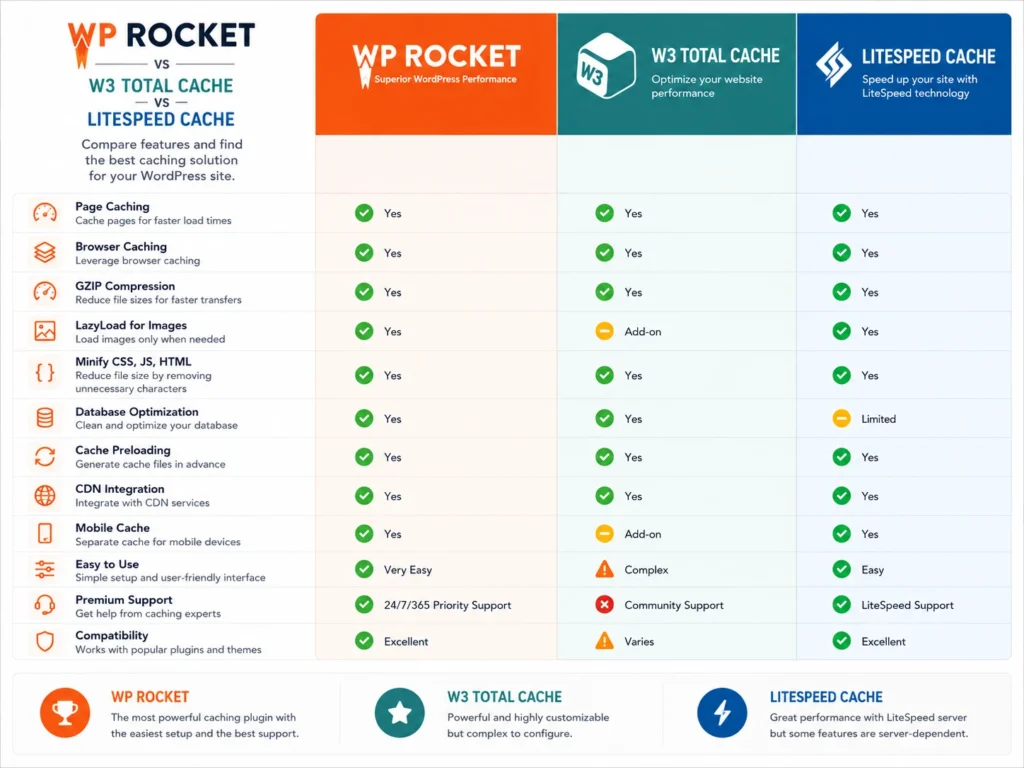
WP Rocket vs Free Caching Plugins
| Feature | WP Rocket | W3 Total Cache | LiteSpeed Cache |
|---|
| Price | $59/year | Free | Free |
| Setup Difficulty | Very Easy | Complex | Moderate |
| Auto Configuration | ✅ Yes | ❌ Manual | Partial |
| Lazy Loading | ✅ Built-in | ❌ Plugin needed | ✅ Built-in |
| Database Cleanup | ✅ Built-in | ❌ Manual | ✅ Built-in |
| WooCommerce Support | ✅ Dedicated | Basic | Basic |
| CDN Integration | ✅ Easy | Complex | Moderate |
| Support | Priority | Community | Community |
| Breaks Websites | Rarely | Frequently | Occasionally |
The core advantage WP Rocket holds over free alternatives is not just features — it is reliability and ease. Furthermore, W3 Total Cache in particular has a long reputation for breaking websites when settings are misconfigured. Consequently, many website owners spend hours troubleshooting problems that WP Rocket simply does not create.
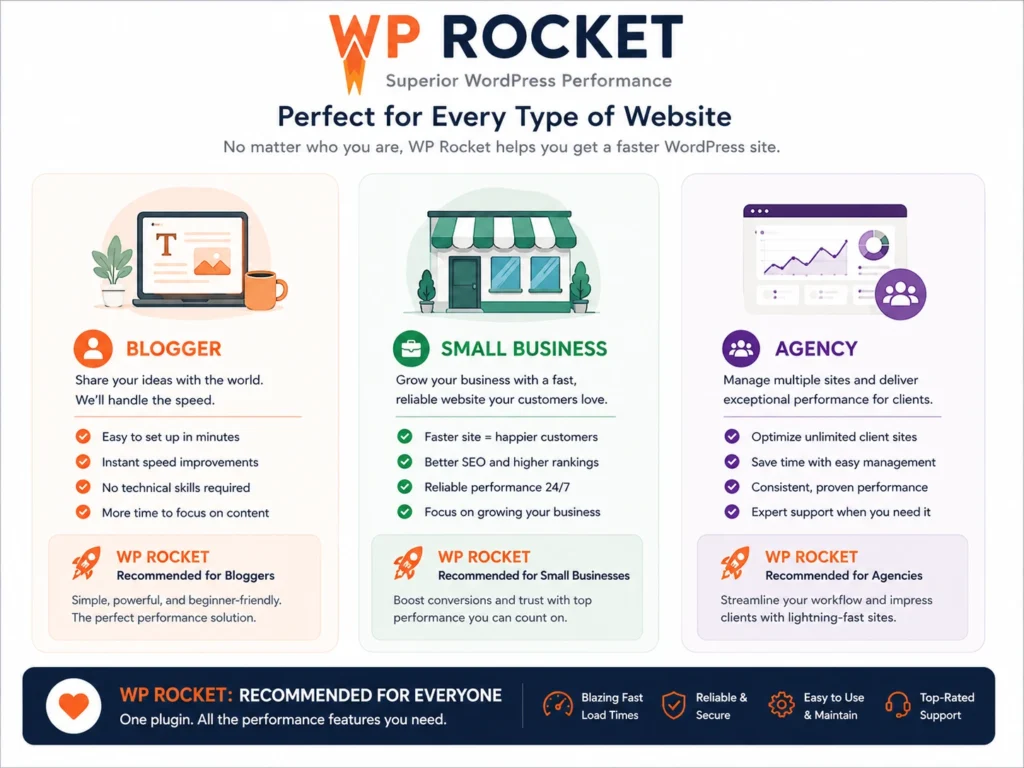
Who Should Use WP Rocket?
Bloggers and Content Creators
WP Rocket improves page speed without requiring technical expertise. Furthermore, bloggers who publish frequently benefit from scheduled database cleanups that prevent performance degradation over time. Consequently, your site stays fast as your archive grows.
Small Business Owners
A slow business website loses potential customers before they read your first sentence. Moreover, WP Rocket’s WooCommerce integration ensures your online store’s checkout process stays fast and reliable. Therefore, the investment pays back through improved conversion rates rather than just technical satisfaction.
Agencies and Developers
WP Rocket’s Infinite plan makes it cost-effective for agencies managing multiple client websites. Furthermore, the plugin’s reliability means fewer emergency calls about broken pages after a plugin update. Consequently, agencies confidently recommend WP Rocket knowing it rarely creates problems they need to troubleshoot.
Conclusion
Speed optimization is not optional for WordPress websites that want to rank well and convert visitors effectively.
WP Rocket makes that optimization accessible, reliable, and genuinely effective — for technical and non-technical users equally. Furthermore, its combination of automatic best-practice application, eCommerce-specific optimizations, and thoughtful settings design produces results that free alternatives require significantly more effort to match.
Moreover, the 5.47 million websites trusting WP Rocket represent something meaningful — a community of website owners who found a solution that actually works and kept paying for it year after year.
Therefore, if your WordPress website needs to load faster — and almost every WordPress website does — WP Rocket is the most straightforward path to meaningful, lasting improvement.
Frequently Asked Questions (FAQs)