Most websites look perfect at launch and slowly deteriorate as technology moves on around them.
Furthermore, what separates sites that thrive for years from those that crumble after a few months is rarely about how they looked on day one. It is about careful preparation that pays off quietly, month after month, long before anything actually breaks.
Future-proofing your WordPress website is not one big project you complete and forget. Furthermore, it is a mindset shift — building for the next five years instead of just the next five months. Consequently, the sites still performing well years after launch got there through consistent habits, not luck.
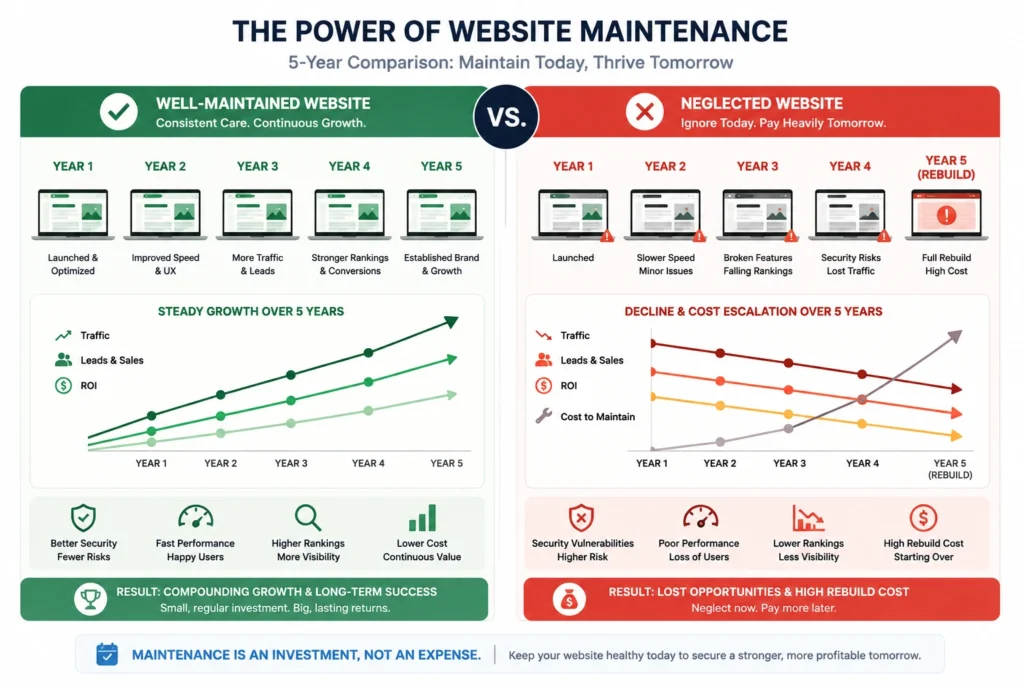
A site that breaks costs real money — lost visitors, lost sales, and the significantly higher price of emergency fixes compared to routine maintenance. Furthermore, if a site falls too far behind, it can require a full rebuild costing thousands, plus every visitor and every sale lost while it was down.
In this guide, we walk through exactly what future-proofing a WordPress website actually means, and the specific, practical habits that keep your site fast, secure, and ready for whatever growth comes next. Furthermore, every recommendation here focuses on protecting your website as the long-term business asset it should be.
What Does "Future-Proofing" Actually Mean?
Future-proofing means ensuring your website continues working properly as circumstances outside your control change. Furthermore, a genuinely future-proofed site works well on different devices, loads quickly for every visitor, and runs on clean, organized code that handles updates smoothly rather than breaking.
WordPress sites face specific, recurring risks. Furthermore, major updates roll out several times a year, plugins occasionally conflict with each other, hosting environments change, browsers update their standards, and Google regularly shifts its ranking factors. Consequently, sites that stay current with these shifts rarely break — while sites that skip maintenance eventually fail, almost always at the worst possible moment.
Think about your website during your busiest season. Furthermore, what happens if it crashes exactly when customers are trying to reach you, or if your contact form silently stops working right when people need help most? Moreover, the cost gap between prevention and emergency repair is real — planned maintenance takes minutes weekly, while emergency fixes can shut a business down for days.
Strategies to future-proof your WordPress website
Pillar 1: Choose a Future-Proof Technology Stack
The backbone of your website shapes everything that follows. Furthermore, the choices you make now either prevent or guarantee costly overhauls down the road.
Why WordPress Itself Remains a Safe Long-Term Bet
WordPress powers nearly half of all websites online. Furthermore, it earns that position by bending to fit nearly any project imaginable while never compromising on core stability. Moreover, updates roll out regularly but carefully respect backward compatibility — a balance that makes WordPress uniquely prepared for future challenges compared to many closed alternatives.
Choosing Hosting That Scales With You
Your hosting provider influences everything — how quickly pages load and how safely your data is stored. Furthermore, budget hosting deals look tempting until real traffic arrives; cramming too many websites onto a single server causes performance to crawl exactly when visitors are flooding in. Consequently, choosing WordPress-specific managed hosting that lets you start modestly and expand naturally avoids the painful, disruptive migration that under-provisioned hosting eventually forces.
Choosing a Page Builder Built to Last
Your page builder determines how easily you update your site’s design over time. Furthermore, look for builders with strong ongoing development, an active user community, and a track record of improving without breaking existing sites. Consequently, this single decision affects how painful or painless every future design change becomes.
Pillar 2: Keep Your WordPress Site Consistently Updated
Website maintenance is not flashy, but it is the backbone of a genuinely healthy WordPress site. Furthermore, just as you would not skip oil changes for a car, your site needs regular attention to keep running smoothly.
Most site crashes happen because something got outdated — WordPress core itself, or perhaps that slider plugin installed and forgotten a year ago. Furthermore, each piece of your site connects to others in ways that are not always obvious, so one neglected component can quietly undermine everything else.
Set aside 15 minutes each week specifically for reviewing and applying updates. Furthermore, pay special attention to security patches — hackers actively scan for exactly these known vulnerabilities. Moreover, turning on auto-updates works well for simpler plugins from trusted sources, while complex tools running critical site functions deserve a more careful, staged approach — testing on staging first, then applying to the live site. Consequently, sites that stay consistently current rarely break during updates, while sites that skip maintenance for months often crash precisely when you finally attempt to catch up.
Pillar 3: Make Your Site Fast and Genuinely Mobile-Friendly
Fast, mobile-friendly websites remain viable longer as the web evolves. Furthermore, when your site already performs well across devices and loads quickly, you are prepared for shifts in user expectations and search algorithms — reducing the need for emergency overhauls later.
The ideal page load time sits under two seconds. Furthermore, abandonment rates climb dramatically after that threshold — visitors simply leave rather than waiting. Consequently, speed is not a nice-to-have polish item; it is a core requirement for a website that stays relevant.
A dedicated caching and optimization plugin handles technical speed work by combining caching, code minification, and lazy loading in one package. Furthermore, image optimization tools automatically compress visuals and convert them to modern, mobile-friendly formats — dramatically reducing data usage for phone visitors specifically. Moreover, mobile-specific design controls let you adjust elements for phones and tablets independently — larger buttons, simplified menus, or hiding elements that simply do not work well on small screens.
Pillar 4: Create Content That Actually Lasts
Website pages from years ago either thrive or disappear — rarely anything in between. Furthermore, behind every lasting page sits someone who checked for outdated details and refreshed them before Google or visitors noticed the staleness.
If your services page mentions old pricing or references a year that has since passed, it looks outdated the moment a visitor arrives after that date. Furthermore, the same applies to old testimonials, ancient screenshots in case studies, or references to industry conditions that have since changed. Consequently, visitors rarely notice specific dates consciously — they simply sense when something feels current or past its prime.
Mark two dedicated days each year for content audits — one early in the year for annual updates, another mid-year to catch seasonal drift. Furthermore, start with your highest-value pages first — home, services, and about pages — then work through blog content that still pulls meaningful traffic. Moreover, SEO plugins help you check technical basics like titles and keywords, but they cannot flag a paragraph referencing outdated context; that human review remains essential.
Pillar 5: Protect Your Site From Bad Actors
Big sites get hacked. Small sites get hacked. Furthermore, the only meaningful difference is that some owners restore their site within minutes while others lose weeks of work entirely.
According to leading WordPress security researchers, roughly 97% of all WordPress vulnerabilities originate from plugins and themes rather than WordPress core itself. Furthermore, this single statistic is the most valuable piece of security information any WordPress owner can internalize — the answer is not avoiding plugins entirely, but being genuinely intentional about which ones you install and keep.
Install a reliable backup plugin and set it to save daily copies automatically to cloud storage separate from your hosting server. Furthermore, most people skip the critical follow-up step — actually testing that backup by restoring it to a test environment periodically, since many discover their backup process was broken only after disaster strikes.
Implement a Web Application Firewall that filters malicious requests before they ever reach your site — think of it as a bouncer standing between your server and incoming traffic. Furthermore, enable multi-factor authentication on every administrator account, since a username and password alone is no longer sufficient protection. Moreover, basic database hardening — changing default table prefixes and obscuring your login URL from automated bots — closes common, easily automated attack paths.
Pillar 6: Keep Room for Future Growth
Good websites grow with your business. Furthermore, bad ones break the moment you try adding something new — and the difference almost always comes down to planning ahead rather than reacting under pressure.
That new plugin looked perfect until it crashed your homepage. Furthermore, that routine WordPress update wiped out a custom menu nobody remembered configuring manually. These headaches happen specifically because changes made directly to a live website carry real, unnecessary risk.
A staging environment is essentially a practice field for your website — a private copy where you test new plugins, apply updates, and adjust design elements without any risk to what visitors currently see. Furthermore, once everything works correctly on staging, you push those changes to your live site with confidence. Consequently, when a major WordPress version releases, you test it safely on staging while sites without this habit scramble to fix unexpected issues on their actual live website.
Pillar 7: Understand Your Audience Through Real Data
Your website visitors tell you what works through their actual behavior. Furthermore, where they click, how long they stay, and which pages they abandon all reveal genuinely valuable information for building a better, more future-proof site.
Connect Google Analytics directly to your WordPress dashboard so you can review performance without switching between separate platforms constantly. Furthermore, watch specifically for patterns — pages with unusually high exit rates or forms with low completion rates signal problems worth investigating before they cost you meaningful business.
Built-in or plugin-based A/B testing tools let you compare different versions of a headline, button, or entire page layout directly, showing variations to different visitors and measuring which one actually drives more engagement or conversions. Furthermore, this data-driven approach reveals how user preferences evolve over time — sites that respond to real behavior stay relevant far longer than those built purely on assumptions that quietly become outdated.
Building Your Future-Proof Maintenance Rhythm
Creating a lasting WordPress site works like tending a garden — plant what works now, care for it regularly, and adjust when genuinely needed. Furthermore, too many website owners put off maintenance until something breaks, then face the costly emergency repairs that consistent habits would have prevented entirely.
Take a genuinely honest look at your current setup. Furthermore, load your site on a phone using average cellular service rather than fast office WiFi. Fill out your own contact form as if you were a first-time visitor. Check honestly when you last updated your security plugins. Consequently, this simple check catches problems that regular visitors notice but owners often miss entirely.
| Frequency | Tasks |
|---|
| Weekly (15 minutes) | Review and apply updates, then run a fresh backup. |
| Monthly | Test backup restoration and review analytics for performance trends. |
| Quarterly | Remove unused plugins and review security scan results. |
| Twice Yearly | Conduct a full content audit by refreshing outdated pages and case studies. |
Furthermore, mark these sessions on your calendar like any other important appointment. Moreover, small, regular tune-ups genuinely prevent the panic that comes when problems eventually surface on a neglected site.
Build for Flexibility, Not Perfection
Long-lasting websites are not always the prettiest ones at launch. Furthermore, they are the ones built to change easily as requirements, technology, and audience expectations shift around them.
Protect custom design work through child themes so core updates never overwrite your customizations. Furthermore, always test significant changes on a staging site before your visitors ever see them. Moreover, keep clear notes about any custom code added over time, since memory fades considerably faster than most owners expect.
Your website should grow with your business continuously. Consequently, treating it as a finished project that never needs revisiting is the single most common mistake that turns a strong launch into a neglected, vulnerable site within a few years.
Many site owners burn out trying to handle everything personally. Furthermore, smart owners recognize when to bring in help — whether that means training a team member on basic update routines or hiring outside expertise for more technical challenges like architecture changes or security hardening.
Conclusion
Websites that still work well years after launch did not get there by accident. Furthermore, someone selected a flexible, reliable stack, stayed current with updates, and caught performance and security issues before visitors ever noticed a problem.
WordPress handles the complicated foundational work through its reliable, backward-compatible core, while the right combination of hosting, page builder, and maintenance habits lets you adapt without constant expensive intervention. Furthermore, combining this solid foundation with consistent weekly, monthly, and annual routines creates a genuinely resilient system.
These habits might seem small individually — a 15-minute weekly update check, a twice-yearly content audit, a monthly backup test. Furthermore, they compound significantly over time. Every update strengthens your site. Every security fix builds customer confidence. Every speed improvement keeps visitors from leaving. Consequently, that is what careful, consistent planning actually earns you.
Therefore, start with an honest assessment of where your website stands today. Build your maintenance rhythm. Test changes safely before they go live. Your WordPress website becomes exactly what it should be — a reliable, growing business asset rather than a ticking time bomb waiting for the worst possible moment to fail.
Frequently Asked Questions (FAQs)